ROMANIAN RADIOS GOLD EDITION V3.0
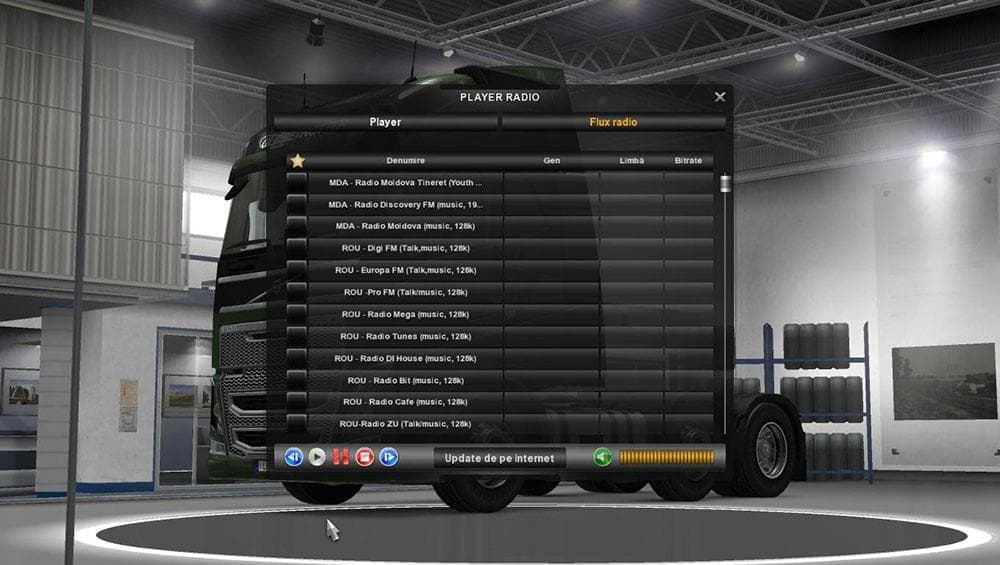
The "ROMANIAN RADIOS GOLD EDITION" mod version 3.0 adds 50 Romanian radio stations to Euro Truck Simulator 2, fulfilling popular demand. It is compatible with a
ROMANIAN RADIOS GOLD EDITION V3.0 is a sound mod that brings a collection of 50 Romanian radio stations into Euro Truck Simulator 2. This type of mod enhances the in-game audio experience by expanding the variety of music and talk stations available while driving, offering a more immersive atmosphere tailored to specific regional tastes. Sound mods like this one usually replace or add to existing radio options without affecting gameplay mechanics.
In ETS2, sound mods generally need to be loaded near the top of your mod list because they modify audio elements that other mods might also adjust, such as truck engine sounds or environment noises. Placing them correctly helps avoid conflicts and ensures the radio selections work as intended alongside any other sound or truck mods you use. This mod fits well in setups where players want a richer auditory experience connected to Romania or Eastern Europe.
Since it includes numerous Romanian stations, this mod is particularly suited for players who enjoy exploring that part of the map or have an interest in Romanian culture and media. It complements map mods covering regions like Romania and the Balkans by adding local flavor through authentic radio content. Users should keep in mind compatibility with their current version of ETS2, though this mod claims broad support across versions.
Players looking to diversify their in-cab entertainment beyond default stations will find ROMANIAN RADIOS GOLD EDITION V3.0 appealing. It’s an easy way to bring some regional specificity without altering core game files or performance significantly, making it a solid addition for those who appreciate sound customization in trucking simulators.
How to install
1. Download the .scs file. 2. Drop it into `Documents/Euro Truck Simulator 2/mod/`. 3. Enable in Mod Manager. Sound mods usually need to load **above** truck mods in load order. 4. Restart the game so the audio engine picks up new samples.
After the mod loads, save your game inside a safe area (parking lot or service) before deciding whether to keep it. If the game refuses to load with the mod enabled, check that all required DLCs are installed and that the supported ETS2 version chips on this page include your installed game patch.
Reviews
No ratings yetNo reviews yet — be the first to rate this mod.





