RENAULT MAGNUM & PREMIUM INTERIOR 1.21.X
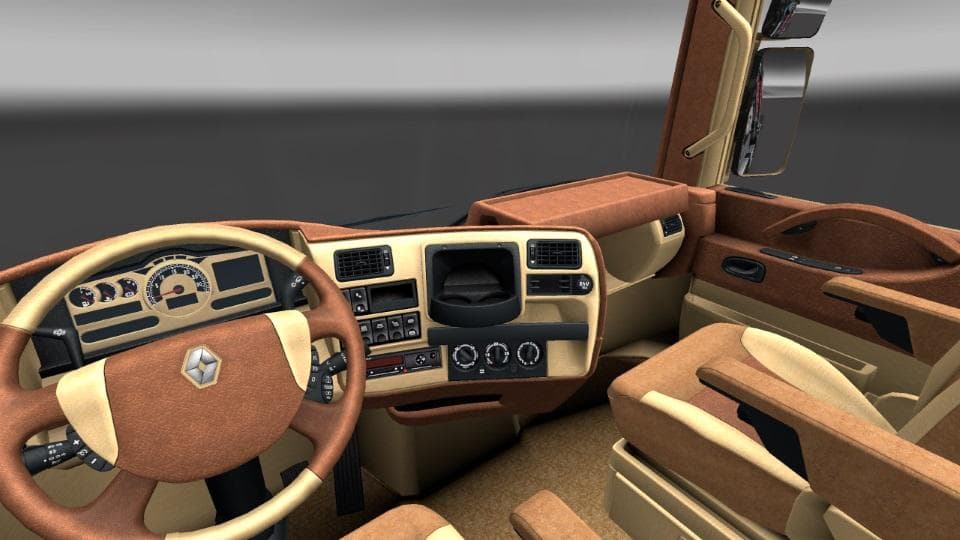
This mod offers Renault Magnum & Premium interior for ETS2 version 1.21.x. Created by Euro Truck Simulator 2, the file size is 980 KB and can be found on Upload
The RENAULT MAGNUM & PREMIUM INTERIOR 1.21.X mod brings a detailed cabin environment specifically for the Renault Magnum and Premium trucks in Euro Truck Simulator 2. It replaces or enhances the in-game interior visuals, offering players a fresh look inside these particular models. Mods like this generally focus on improving immersion by updating textures, adding new dashboard elements, or adjusting lighting effects within the truck's cabin.
Interior mods such as this one usually load without conflicting with gameplay mechanics but can interact with other mods that alter truck exteriors or UI components. Since it's tailored for ETS2 version 1.21, it fits well within setups using that game version and should be placed appropriately in the mod manager to avoid overriding conflicts, especially with other interior-related files.
Players who enjoy customizing their trucks beyond just the outside will find this mod useful. It caters to those who want a more authentic or visually refreshed driving experience from inside their cab, which can enhance long hauls through regions like France, Germany, or Spain where Renault trucks are commonly seen.
When running a heavily modded profile, it’s wise to check how this interior mod interacts with others affecting similar areas. Load order might matter if you’re combining multiple cabin or UI improvements to ensure that textures and designs display correctly without glitches.
This mod is straightforward to install via the in-game Mod Manager. Simply activate it after downloading and make sure your game version matches 1.21 for proper functionality. It's a solid pick for anyone focused on truck interiors rather than exterior skins or map expansions.
How to install
1. Download the file(s) from the original source linked above. 2. Drop them into `Documents/Euro Truck Simulator 2/mod/`. 3. Enable in Mod Manager and restart the game.
After the mod loads, save your game inside a safe area (parking lot or service) before deciding whether to keep it. If the game refuses to load with the mod enabled, check that all required DLCs are installed and that the supported ETS2 version chips on this page include your installed game patch.
Reviews
No ratings yetNo reviews yet — be the first to rate this mod.





