NO BLOOM (HDR MOD) 1.22.X
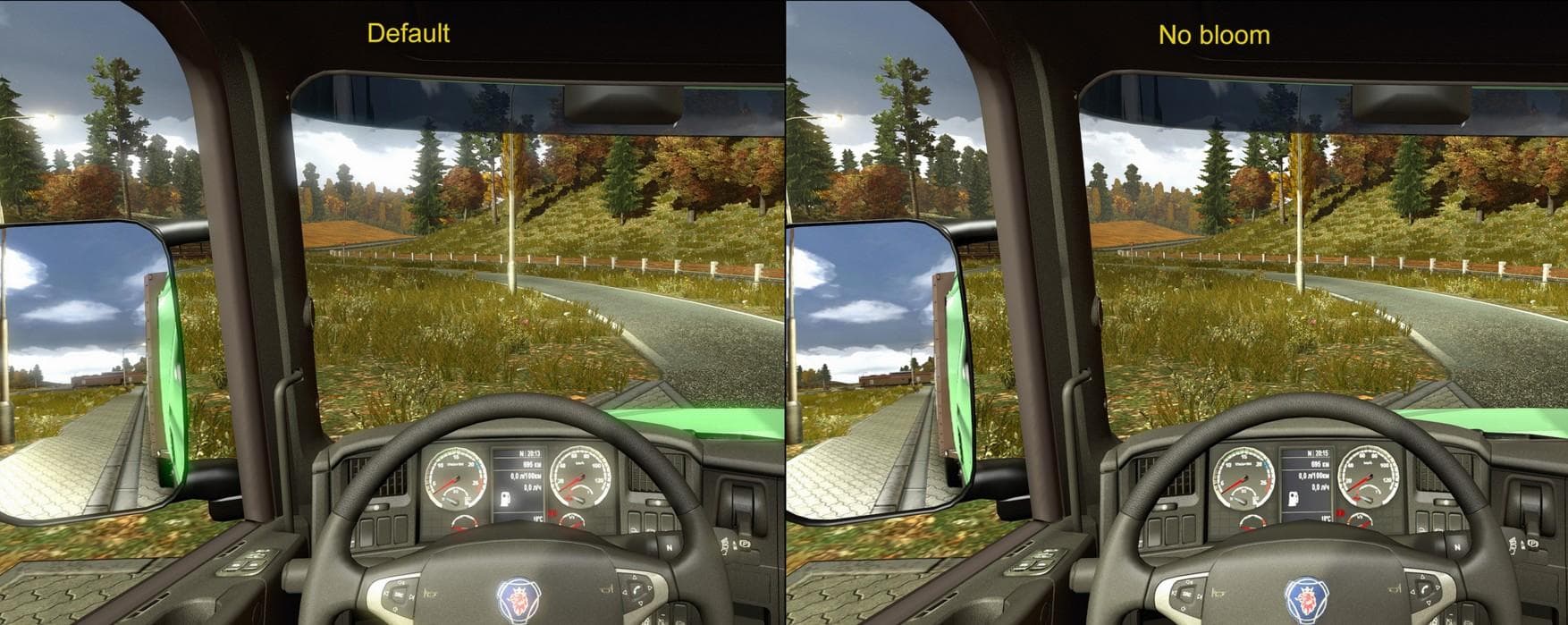
The NO BLOOM (HDR MOD) 1.22.X mod for ETS2, created by Euro truck simulator 2, removes bloom effects in version 1.22. The update credits Косяк_Марихуанович and
NO BLOOM (HDR MOD) 1.22.X is a sound mod designed for Euro Truck Simulator 2 version 1.22. While it’s categorized under sounds, this type of mod typically adjusts or replaces audio elements related to the game's environment or effects rather than engine or horn sounds specifically. Mods like this one can subtly change the in-game atmosphere by tweaking how certain audio cues play during gameplay.
Sound mods in ETS2 generally need careful placement in the load order to work correctly. They usually have to be loaded above truck mods since they override specific sound files that trucks use. This ensures that any custom engine or environmental sounds aren’t accidentally overwritten by other vehicle mods you might have installed.
Integrating NO BLOOM (HDR MOD) into a modded setup is straightforward if you follow standard procedures for sound mods. Since it supports ETS2 version 1.22, users running that game version will find it compatible without needing additional patches or fixes. It’s always wise to check your existing mods for conflicts, especially if they also modify audio elements.
This mod fits players who want a different audio experience related to HDR effects in their game environment. It may appeal to those who tweak visual and auditory settings simultaneously to create a more personalized simulation feel. If you're experimenting with various sound profiles or environmental tweaks, this could be an interesting addition.
Overall, NO BLOOM (HDR MOD) is a niche mod for players focused on fine-tuning their game's audio details within the 1.22 update framework. Its creator is unknown, and while file size details aren’t specified, such mods are generally lightweight and easy to install via the standard mod manager interface.
How to install
1. Download the .scs file. 2. Drop it into `Documents/Euro Truck Simulator 2/mod/`. 3. Enable in Mod Manager. Sound mods usually need to load **above** truck mods in load order. 4. Restart the game so the audio engine picks up new samples.
After the mod loads, save your game inside a safe area (parking lot or service) before deciding whether to keep it. If the game refuses to load with the mod enabled, check that all required DLCs are installed and that the supported ETS2 version chips on this page include your installed game patch.
Reviews
No ratings yetNo reviews yet — be the first to rate this mod.





