MOSS TRANSPORT FORUM PACK
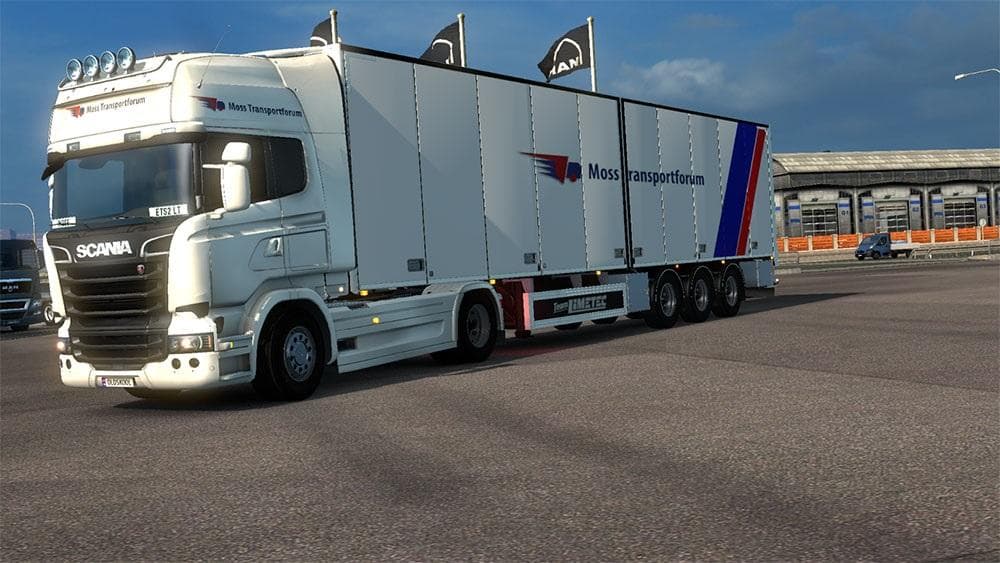
MOSS TRANSPORT FORUM PACK - ETS2 mods download is an ETS2 skins.
The MOSS TRANSPORT FORUM PACK is a skin mod designed specifically for the Scania Streamline in Euro Truck Simulator 2. This pack includes a repaint for both the truck itself and a standalone trailer, allowing players to customize their vehicles with this particular livery. Since it only supports the Scania Streamline model, it’s important to have that base vehicle available in your game to use the skins properly.
Skin mods like this one don't change the shape or performance of your truck or trailer; they simply apply new paint jobs or designs in the paint shop. They rely entirely on the existing models in ETS2 and offer a way to personalize your fleet without altering gameplay mechanics. In this case, both the truck and trailer are covered by this combo pack, so you get a matched look if you prefer consistent styling.
When adding skin mods into a modded setup, it's good practice to manage load order carefully. Skins usually go after map or gameplay mods but before any texture-enhancing mods that might override visual details. Because this pack is standalone for its trailer and tied to the Scania Streamline, it should fit smoothly alongside other compatible skins without conflict.
Players who enjoy customizing their trucks with unique liveries will find this mod fits well if they're running Scania Streamline trucks exclusively. It suits those who want a cohesive appearance between their tractor and trailer, especially if they favor specific transport company branding or just want some variety beyond default options.
As with most skin mods, installation involves placing files into your mod folder and activating them in-game via the mod manager. The absence of known version info means checking compatibility with your current ETS2 version before use is wise. Still, these kinds of skins typically don’t impact game stability much when used correctly.
How to install
1. Download the .scs file. 2. Drop it into `Documents/Euro Truck Simulator 2/mod/`. 3. Enable in Mod Manager. 4. Apply the skin in the truck/trailer paint shop.
After the mod loads, save your game inside a safe area (parking lot or service) before deciding whether to keep it. If the game refuses to load with the mod enabled, check that all required DLCs are installed and that the supported ETS2 version chips on this page include your installed game patch.
Reviews
No ratings yetNo reviews yet — be the first to rate this mod.





