MERCEDES SPRINTER V5
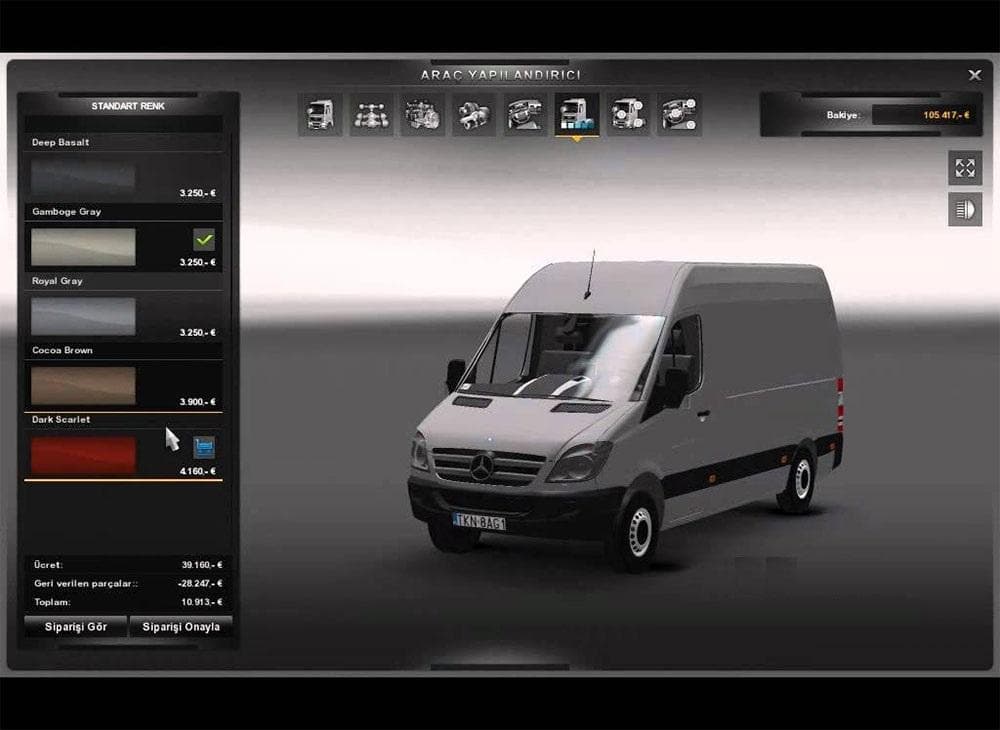
This ETS2 mod for the Mercedes Sprinter V5 includes fixes for mirror and GPS bugs, as well as new skins. It is now compatible with all maps and old versions of
The MERCEDES SPRINTER V5 mod offers a collection of new skins for the Mercedes Sprinter in Euro Truck Simulator 2. This type of mod doesn't alter the truck's model but changes its appearance through different paint jobs applied in the paint shop. Players can customize their Sprinter to better fit their personal style or roleplay needs without affecting gameplay mechanics.
Skin mods like this one are straightforward to install and use. Since they rely on the base vehicle, it's important to have the correct version of the Mercedes Sprinter already in your game. The V5 update reportedly fixes mirror and GPS bugs, improving visual accuracy and functionality when driving across various maps. Compatibility with older versions and all map expansions is noted, which helps maintain stability in a modded setup.
When combining skin mods with other enhancements, paying attention to load order is helpful, especially if multiple skins or truck-related mods are used. Typically, skins should load after any model or tuning mods to ensure their designs show correctly. MERCEDES SPRINTER V5 fits well into setups that include map expansions like Germany, France, or Spain as it supports all maps.
This mod will appeal to players who enjoy adding variety and detail to their fleet without changing the underlying truck model. If you frequently drive a Sprinter for delivery jobs or prefer a customized look while exploring regions such as Austria or Italy, these skins offer fresh options that keep your game visually interesting.
Overall, MERCEDES SPRINTER V5 serves those looking for improved visuals on a popular van model alongside bug fixes that enhance usability across ETS2's diverse environments.
How to install
1. Download the .scs file. 2. Drop it into `Documents/Euro Truck Simulator 2/mod/`. 3. Enable in Mod Manager. 4. Apply the skin in the truck/trailer paint shop.
After the mod loads, save your game inside a safe area (parking lot or service) before deciding whether to keep it. If the game refuses to load with the mod enabled, check that all required DLCs are installed and that the supported ETS2 version chips on this page include your installed game patch.
Reviews
No ratings yetNo reviews yet — be the first to rate this mod.





