MERCEDES ACTROS MP4 RUSSIA FLAG SKIN 1.22
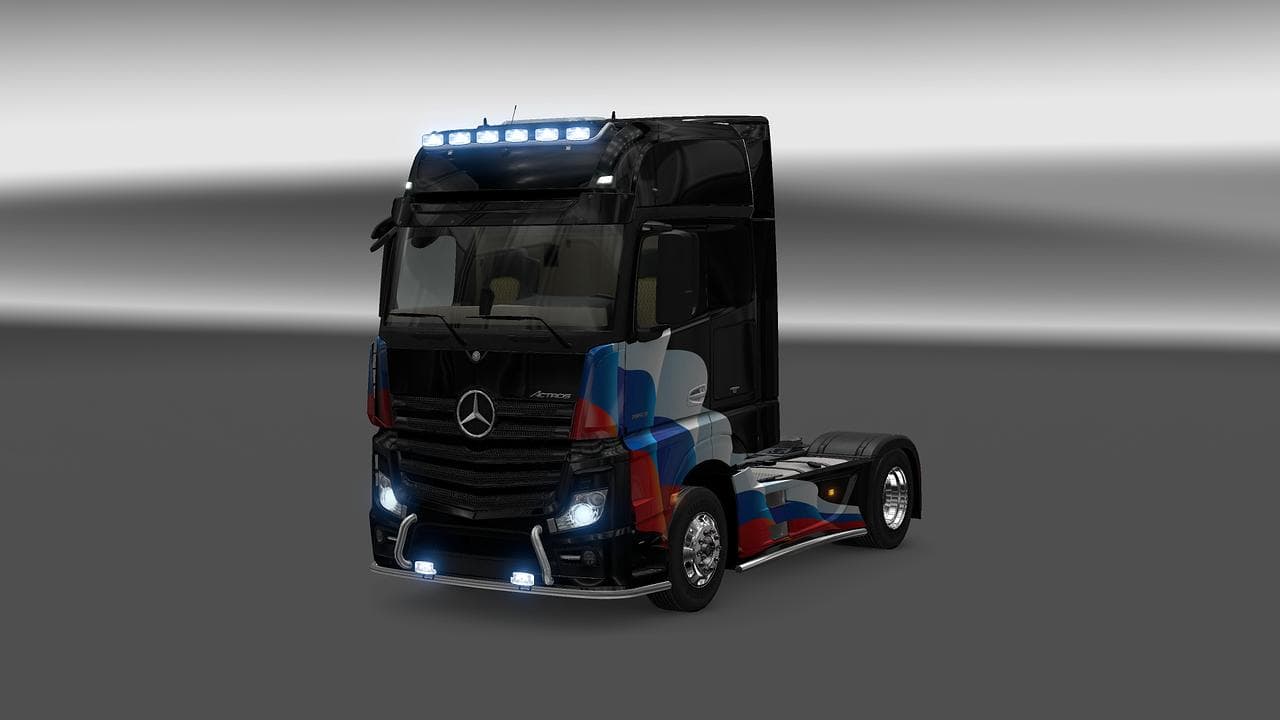
This mod adds a Russia flag skin for the Mercedes Actros MP4 truck in ETS2 version 1.22. Created by Euro truck simulator 2, the file size is 291 KB.
This mod offers a repaint of the Mercedes Actros MP4 truck featuring the Russian flag. It’s designed for ETS2 version 1.22 and updates the truck's appearance without altering its structure or performance. Skin mods like this one are applied through the in-game paint shop and require the base vehicle model to be present, so this skin specifically fits the Mercedes Actros MP4.
Skins such as this refresh the look of your trucks by adding new liveries or designs that can make your fleet stand out on European roads. Since they don't modify gameplay mechanics or vehicle stats, they tend to work smoothly alongside other mods, provided they don’t replace the same files. Generally, skins load after model mods to ensure their textures apply correctly.
When integrating this skin into a modded setup, it’s good practice to check load order and conflicts with other skins for the same truck. Conflicts might cause visual glitches or prevent the skin from appearing properly. Usually, keeping skins low in load priority helps maintain compatibility across various mods.
This repaint suits players who want to personalize their Mercedes Actros MP4 with a distinct **Russia flag** theme. It's especially appealing for those who enjoy representing specific countries or just want a bit of variety beyond default truck colors. The mod fits well into themed convoys or roleplay scenarios centered around Russia.
Since the creator is unknown and file details aren't specified, users should always back up their profiles before installing any skin mod. But being a straightforward repaint targeting one game version keeps installation and troubleshooting relatively simple compared to larger content packs.
How to install
1. Download the .scs file. 2. Drop it into `Documents/Euro Truck Simulator 2/mod/`. 3. Enable in Mod Manager. 4. Apply the skin in the truck/trailer paint shop.
After the mod loads, save your game inside a safe area (parking lot or service) before deciding whether to keep it. If the game refuses to load with the mod enabled, check that all required DLCs are installed and that the supported ETS2 version chips on this page include your installed game patch.
Reviews
No ratings yetNo reviews yet — be the first to rate this mod.





