Mercedes actros 2014 Sports Interior v0.9
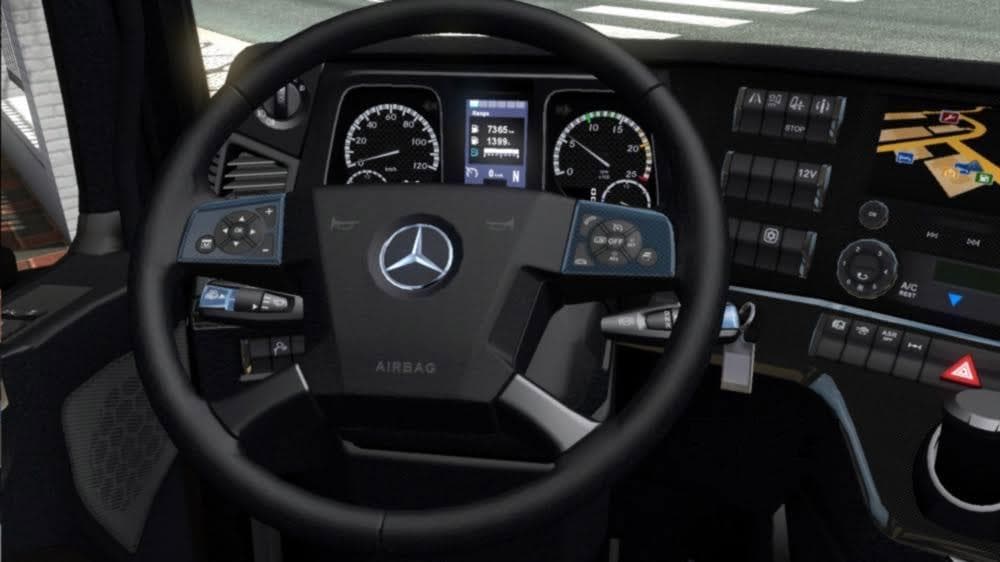
Mercedes actros 2014 Sports Interior is an ETS2 interior.
The Mercedes Actros 2014 Sports Interior v0.9 mod changes the in-cab environment of this popular truck model by replacing the standard textures with a sporty design featuring carbon panels and black and red leather seats. It focuses on giving the driver's space a more dynamic look that contrasts with the default interior styling. This kind of mod is typically installed through ETS2's built-in Mod Manager, making it straightforward to add or remove as desired.
Interior mods like this one primarily alter visual elements inside the truck cabin without affecting gameplay mechanics or external truck models. By swapping textures and materials, they let players customize their driving experience to match personal preferences or themed setups. Since these mods only affect interior visuals, they generally don't conflict with other types of modifications such as map expansions or new trucks.
When adding an interior mod into a larger modded setup, it's good practice to consider load order especially if multiple interior mods are installed simultaneously. ETS2 loads mods in sequence from top to bottom in the Mod Manager, so if two mods change the same textures, the one loaded last will take precedence. Compatibility issues are rare but can occur if several mods target identical parts of a truck's cabin.
Players who appreciate customizing every aspect of their rig might find this sports interior appealing for its distinctive color scheme and material choices. It suits those wanting a fresher or more aggressive feel inside their Actros without changing how the truck performs on roads across Europe.
Given its focus on aesthetics within the cab, this mod fits well alongside other cosmetic tweaks or gameplay enhancements that don't interfere with texture replacements. It's an easy way to refresh your driving environment while keeping your overall mod collection balanced.
How to install
1. Download the file(s) from the original source linked above. 2. Drop them into `Documents/Euro Truck Simulator 2/mod/`. 3. Enable in Mod Manager and restart the game.
After the mod loads, save your game inside a safe area (parking lot or service) before deciding whether to keep it. If the game refuses to load with the mod enabled, check that all required DLCs are installed and that the supported ETS2 version chips on this page include your installed game patch.
Reviews
No ratings yetNo reviews yet — be the first to rate this mod.





