MERCEDES 2014-2015 INTERIOR 1.21.X
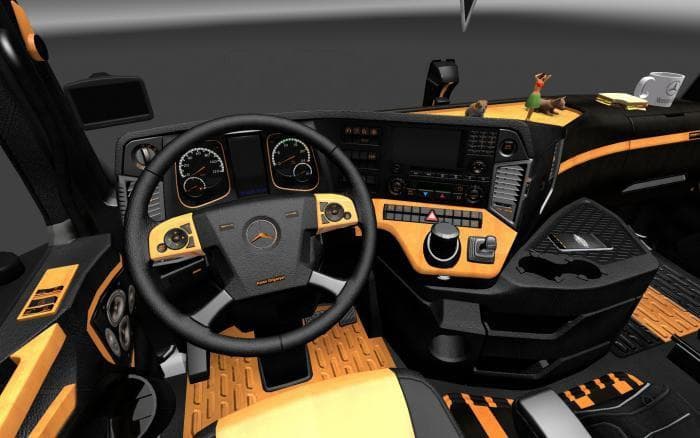
The MERCEDES 2014-2015 INTERIOR 1.21.X mod for ETS2 offers a stylish AMG-inspired interior in orange and black, replacing the default design. It supports interi
This mod updates the interior of Mercedes trucks from 2014 to 2015, focusing on an AMG-inspired design. The color scheme blends orange and black tones, giving the cabin a distinct look compared to the default setup. It swaps out the game's standard interior visuals with these new textures and details.
Mods like this one typically replace or enhance existing truck interiors within Euro Truck Simulator 2. They offer a fresh aesthetic for drivers who want a different feel inside their cab without altering gameplay mechanics. Since it supports interior tuning, players can still customize aspects of their truck’s inside environment while enjoying this updated style.
Being categorized as an 'other' mod means it's installed through ETS2's Mod Manager like many visual or audio tweaks. Users should ensure it's loaded after any other mods affecting the same truck model to avoid conflicts. Compatibility is generally good if you match it with ETS2 version 1.21, which this mod supports directly.
For those running a heavily modded game setup, placing this interior mod properly in the load order helps maintain stability and ensures the visuals display correctly. It’s wise to avoid combining multiple interior mods for the same truck unless they’re designed to work together or merged into one package.
This kind of mod will appeal mostly to players who drive Mercedes trucks regularly and want something different from the default cabin appearance. It adds variety without changing how driving feels or how trucks perform on roads across regions like Germany, France, or Italy.
If you're someone who enjoys tweaking your simulation experience visually, particularly with European trucks, updating your cab’s look can add a subtle but welcome change during long hauls across various in-game countries.
How to install
1. Download the file(s) from the original source linked above. 2. Drop them into `Documents/Euro Truck Simulator 2/mod/`. 3. Enable in Mod Manager and restart the game.
After the mod loads, save your game inside a safe area (parking lot or service) before deciding whether to keep it. If the game refuses to load with the mod enabled, check that all required DLCs are installed and that the supported ETS2 version chips on this page include your installed game patch.
Reviews
No ratings yetNo reviews yet — be the first to rate this mod.





