MAN TGX MAJOO TATTOO SKIN
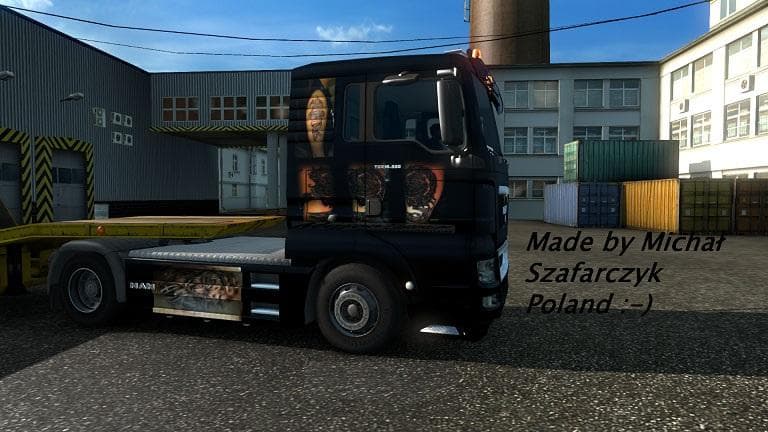
MAN TGX MAJOO TATTOO SKIN is a skin mod for MAN TGX in ETS2 version 1.22. Created by Euro truck simulator 2, it is the creator's first self-made skin for the tr
The MAN TGX MAJOO TATTOO SKIN is a repaint designed specifically for the MAN TGX truck in Euro Truck Simulator 2, compatible with version 1.22 of the game. This mod doesn't alter the truck's structure or performance but gives it a new visual identity through its unique tattoo-themed paint job. Skins like this one are applied directly in the paint shop, allowing players to customize their vehicles without affecting gameplay mechanics.
Skin mods such as this one work by overlaying new textures onto existing truck models, making them a popular way to refresh your fleet's appearance. Since it depends on the MAN TGX base model, you'll need that truck available in your game to use this skin. These types of mods generally don't conflict with other vehicle upgrades or map mods but should be loaded after any other skins to ensure they display correctly.
In a modded setup, skins like the MAN TGX MAJOO TATTOO SKIN fit well alongside other cosmetic modifications and performance tweaks. They add visual variety and let you personalize your trucks without changing how they handle or function on the road. Load order isn't usually critical for skins, but placing them after larger content packs can help avoid texture overrides.
This particular skin would appeal to players who enjoy giving their trucks a distinctive look and want to stand out while cruising across European highways. Whether you're working on a themed convoy or just prefer custom visuals over default paint jobs, adding a tattoo-style design brings some character to your virtual rig.
While the creator is unknown and details like file size aren't provided, it's clear this skin was made by someone experimenting with custom designs for ETS2’s MAN TGX model. It supports version 1.22 of Euro Truck Simulator 2, so make sure your game matches that before installation.
How to install
1. Download the .scs file. 2. Drop it into `Documents/Euro Truck Simulator 2/mod/`. 3. Enable in Mod Manager. 4. Apply the skin in the truck/trailer paint shop.
After the mod loads, save your game inside a safe area (parking lot or service) before deciding whether to keep it. If the game refuses to load with the mod enabled, check that all required DLCs are installed and that the supported ETS2 version chips on this page include your installed game patch.
Reviews
No ratings yetNo reviews yet — be the first to rate this mod.





