M&M’s Skin
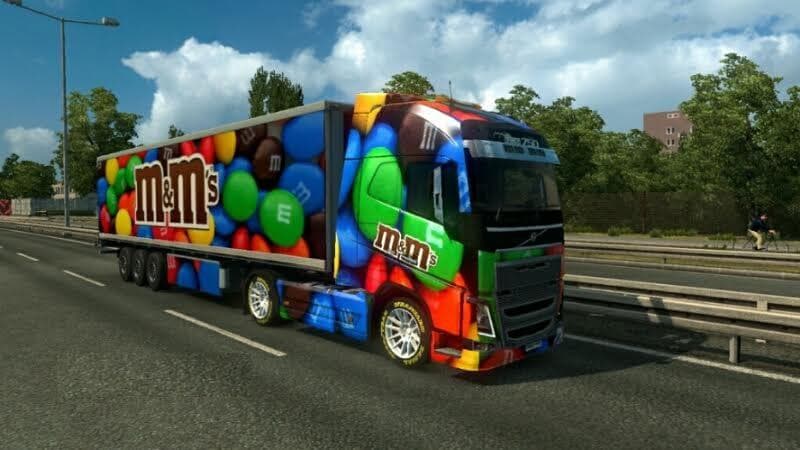
The M&M’s Skin is a repaint mod designed for all trucks and two standalone trailers in Euro Truck Simulator 2. It adds a new visual style without altering the truck models themselves, so the base vehicle's shape and features stay the same. This type of mod is installed through the paint shop, where players can apply it to compatible trucks after ensuring they have the correct base model.
Skin mods like this one focus solely on changing the appearance of vehicles by adding custom designs or themes. They don't affect gameplay mechanics but can enhance immersion or simply let players personalize their rigs. Since this skin was tested on ETS2 version 1.18.x, it should work smoothly with that version and possibly others close to it.
When using skins as part of a modded setup, it's good practice to load them after any truck model mods so they can override default textures correctly. Conflicts are rare if you’re only adding skins since they don’t modify core game files or data beyond visuals. Still, keeping an eye on load order helps prevent any unexpected issues with other cosmetic mods.
This particular skin would appeal to players who want to add a distinctive look to their fleet, especially those who enjoy themed liveries or collecting diverse paint jobs. It fits well alongside other cosmetic mods and doesn’t require additional dependencies, making it easy to include in a broader customization collection.
Because it's designed for all trucks plus some trailers, this M&M’s Skin offers some flexibility if you like consistency across your vehicles. Fans of colorful and branded designs might find this skin an interesting addition that stands out during their drives across Europe.
Overall, M&M’s Skin is a straightforward way to refresh your trucks’ appearances without needing extra models or extensive compatibility tweaks. If you’re running ETS2 version 1.18 and want more variety in your paint options, giving skins like this a try can make your trucking experience feel more personalized.
How to install
1. Download the .scs file. 2. Drop it into `Documents/Euro Truck Simulator 2/mod/`. 3. Enable in Mod Manager. 4. Apply the skin in the truck/trailer paint shop.
After the mod loads, save your game inside a safe area (parking lot or service) before deciding whether to keep it. If the game refuses to load with the mod enabled, check that all required DLCs are installed and that the supported ETS2 version chips on this page include your installed game patch.
Reviews
No ratings yetNo reviews yet — be the first to rate this mod.





