Lightbox Daf XF 105 SCS and 50Keda 1.21
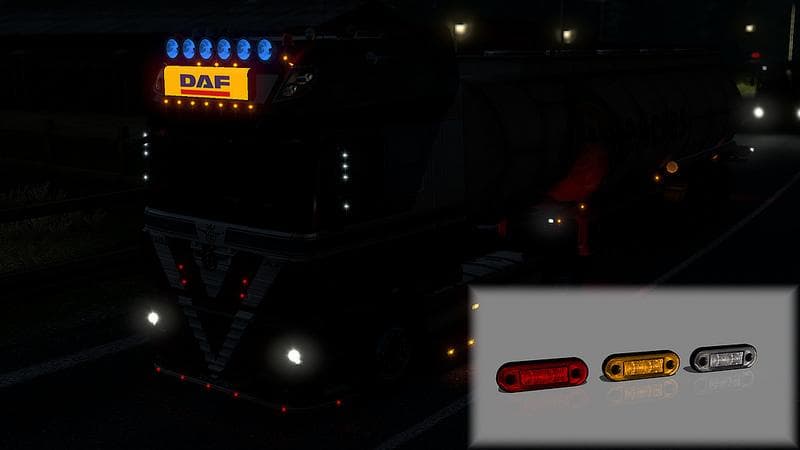
Lightbox Daf XF 105 SCS and 50Keda 1.21 mod adds new horn slot, chrome and painted bar lobar, and 3 new lights for DAF XF 105 trucks in Euro Truck Simulator 2 v
The Lightbox Daf XF 105 SCS and 50Keda mod is a parts add-on designed specifically for the Daf XF 105 truck model in Euro Truck Simulator 2. It brings new visual elements like a horn slot, a chrome bar, and a set of three additional lights, all integrated to enhance the truck's exterior appearance. This type of mod typically allows players to customize their trucks beyond the base game options by adding accessories that reflect personal style or improve realism.
Parts mods such as this one fit into the truck customization menu where you can select various components like bull bars, lights, mirrors, or interior items. Since it's aimed at a particular truck model, it slots neatly into setups focusing on Daf trucks without conflicting with unrelated vehicle mods. These mods usually require compatibility with specific ETS2 versions; this one supports versions 1.21 and 1.4, so make sure your game version matches to avoid issues.
When installing parts mods, load order matters especially if you have multiple add-ons targeting the same truck model or category. Placing this mod after general tuning packs can help ensure its features appear correctly without being overwritten by other files. Players running extensive mod collections should test for any conflicts but generally these parts integrate well when carefully managed.
This mod suits ETS2 drivers who enjoy personalizing their Daf XF 105 with subtle but distinct upgrades rather than overhauls or total redesigns. It’s ideal for those wanting additional lighting options and chrome details to give their rig a slightly refreshed look while maintaining authenticity within the game's environment.
How to install
1. Download the file(s) from the original source linked above. 2. Drop them into `Documents/Euro Truck Simulator 2/mod/`. 3. Enable in Mod Manager and restart the game.
After the mod loads, save your game inside a safe area (parking lot or service) before deciding whether to keep it. If the game refuses to load with the mod enabled, check that all required DLCs are installed and that the supported ETS2 version chips on this page include your installed game patch.
Reviews
No ratings yetNo reviews yet — be the first to rate this mod.