ETS2 LIVE ITALIAN RADIO
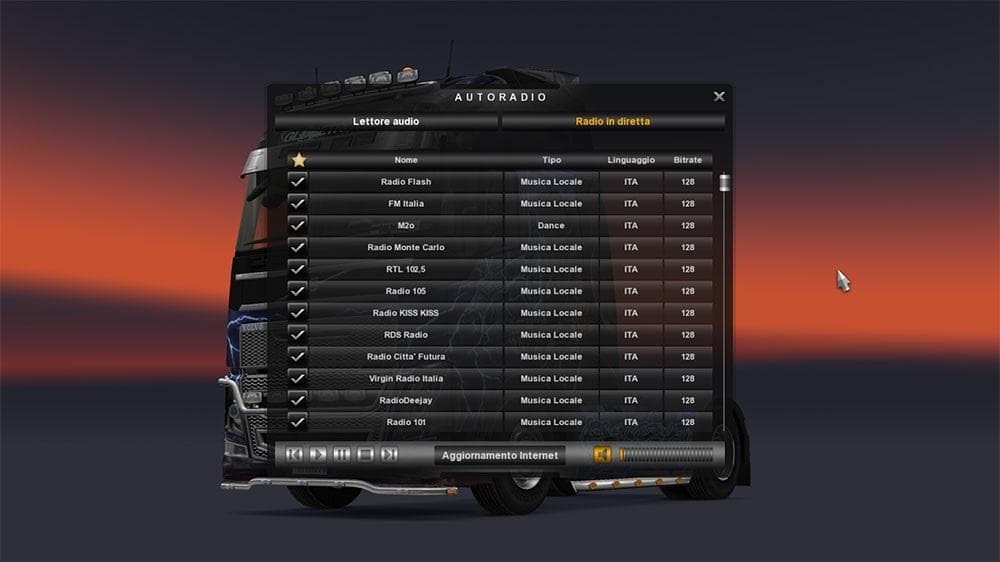
ETS2 LIVE ITALIAN RADIO is a sounds mod for Euro Truck Simulator 2. To use, move the live_streams.sii file to the game's Documents folder. Updated by Mimmo_ITA
This mod brings Italian radio stations into Euro Truck Simulator 2, adding a regional audio experience for players who enjoy driving through or near Italy. It works by replacing or supplementing the in-game radio streams with live broadcasts from Italian stations. To activate it, you need to move a specific file into your ETS2 documents folder, making it pretty straightforward to install.
Sound mods like this one alter the game's audio environment, often focusing on engine sounds, horns, or ambient noises such as radio channels. They usually need to be placed higher in the load order than truck-specific mods because they overwrite sound files that might otherwise be changed by those truck mods. Keeping this mod near the top ensures the radio streams play correctly without conflicts.
In a heavily modded setup, it's wise to check your load order carefully when using sound mods so they don't get overridden. Since this mod replaces radio streams rather than core game files, it generally fits well alongside other types of modifications like visual enhancements or vehicle additions. Just remember not to stack multiple sound mods that target the same files unless they're specifically designed to work together.
Players who want a more authentic Italian atmosphere while trucking will find this mod appealing. If you're cruising through Italy or nearby countries and prefer local radio over generic playlists, this mod adds an extra layer of immersion through its live Italian radio content.
How to install
1. Download the .scs file. 2. Drop it into `Documents/Euro Truck Simulator 2/mod/`. 3. Enable in Mod Manager. Sound mods usually need to load **above** truck mods in load order. 4. Restart the game so the audio engine picks up new samples.
After the mod loads, save your game inside a safe area (parking lot or service) before deciding whether to keep it. If the game refuses to load with the mod enabled, check that all required DLCs are installed and that the supported ETS2 version chips on this page include your installed game patch.
Reviews
No ratings yetNo reviews yet — be the first to rate this mod.





