DC-Candy Apple Red & Silver American Trailer Skin v1
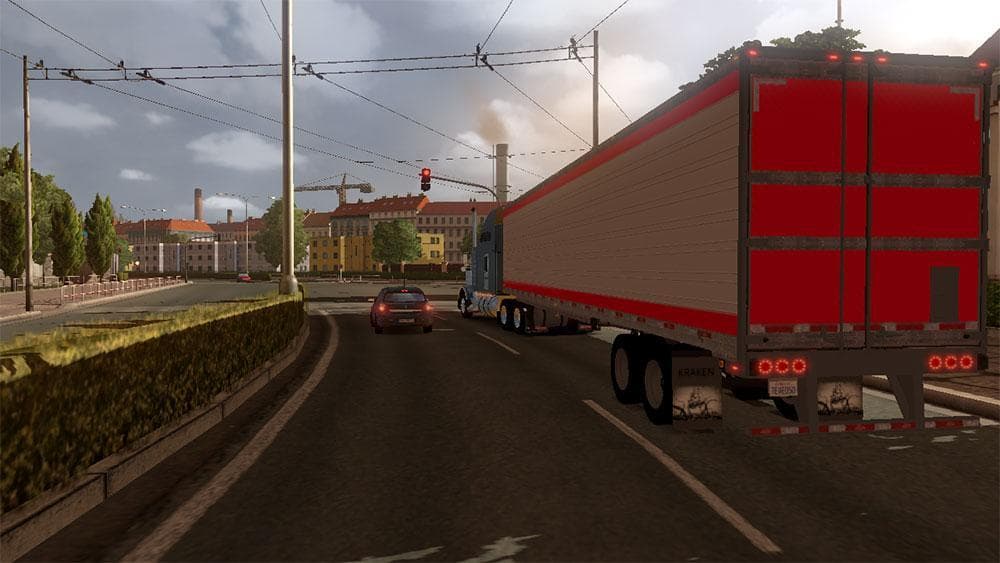
This mod is a skin for American trailers in ETS2, featuring a Candy Apple Red & Silver design. Created by Euro Truck Simulator 2, the mod was last updated on Ap
The DC-Candy Apple Red & Silver American Trailer Skin v1 is a repaint mod that gives your trailer a distinctive candy apple red and silver look. This type of skin mod doesn't alter the trailer's structure or performance but changes its visual appearance, offering a fresh style without modifying gameplay mechanics. Skins like this are applied in the paint shop within ETS2 and depend on the base trailer model they were designed for, meaning you'll need a compatible trailer to see the effect.
Skin mods generally fit well into any modded setup since they don't interfere with other gameplay modifications. They can be stacked with truck skins or map mods without causing conflicts, as long as you pay attention to the load order so that the skin loads after any base trailers it repaints. This ensures your new paint job appears correctly during play.
For players who enjoy customizing their fleet's look, this trailer skin offers an easy way to add some color and personality to their American-style trailers. It suits those who prefer a bold yet clean design and want their rig to stand out on highways across ETS2's expansive maps.
While details like supported ETS2 versions or file size aren't specified here, installing skins typically involves placing files into the mod folder and activating them through the game's mod manager. Users should always check for compatibility with their current game version and other mods to avoid issues.
This particular skin might appeal especially to fans of American trucking themes or those focusing on routes through states like Arizona, California, or Texas where such trailers are common sights. It adds a bit of flair without altering how your hauling experience plays out.
How to install
1. Download the .scs file. 2. Drop it into `Documents/Euro Truck Simulator 2/mod/`. 3. Enable in Mod Manager. 4. Apply the skin in the truck/trailer paint shop.
After the mod loads, save your game inside a safe area (parking lot or service) before deciding whether to keep it. If the game refuses to load with the mod enabled, check that all required DLCs are installed and that the supported ETS2 version chips on this page include your installed game patch.
Reviews
No ratings yetNo reviews yet — be the first to rate this mod.





