DalaFrakt skin RJL Topline
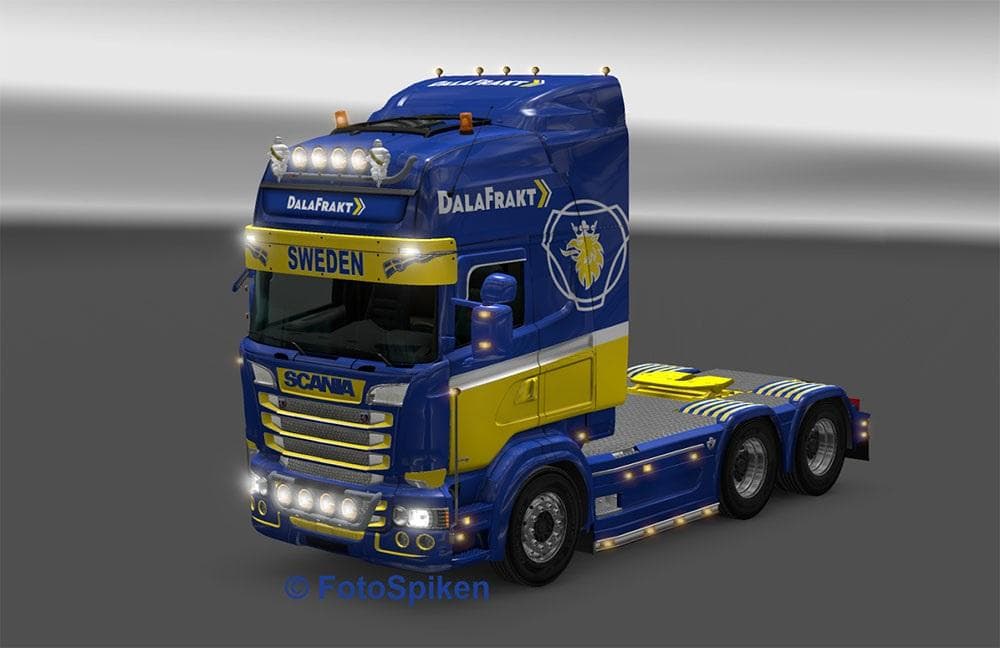
DalaFrakt skin RJL Topline is an ETS2 skins. Listed compatible with ETS2 1.21, 1.22, 1.4.
The DalaFrakt skin RJL Topline is a repaint mod designed specifically for the Scania RJL truck model in Euro Truck Simulator 2. This kind of skin modifies the exterior look without altering the truck's physical model, letting you customize your vehicle's appearance while keeping its original structure intact. It fits into the paint shop section of the game, where you can apply different skins to your trucks based on the base vehicle compatibility.
Skin mods like this one are popular for players who want to add variety or a personal touch to their fleet. Since it's tailored for the Scania RJL (version 1.4 by RJL), you'll want to make sure your game includes this truck mod for it to work correctly. The DalaFrakt skin supports ETS2 versions 1.21 and 1.22 and might also be compatible with earlier versions, though that's not confirmed.
When incorporating skins into a modded setup, load order usually places skins after truck models so that they properly override default textures. Conflicts are rare if you're using skins designed for the same truck version, but mixing incompatible versions or different base trucks can cause issues. Keeping your ETS2 mods organized and updated helps maintain smooth gameplay.
This skin suits drivers who enjoy customizing their vehicles with liveries reflecting real or fictional companies, adding immersion to their trucking experience. If you use the Scania RJL as your main rig and like changing how it looks without replacing models or adding heavy mods, this repaint offers an easy option.
While details about creator or file size aren't available, this DalaFrakt skin remains a straightforward choice for those running supported ETS2 versions and wanting a fresh look for their Topline cab on the Scania RJL.
How to install
1. Download the .scs file. 2. Drop it into `Documents/Euro Truck Simulator 2/mod/`. 3. Enable in Mod Manager. 4. Apply the skin in the truck/trailer paint shop.
After the mod loads, save your game inside a safe area (parking lot or service) before deciding whether to keep it. If the game refuses to load with the mod enabled, check that all required DLCs are installed and that the supported ETS2 version chips on this page include your installed game patch.
Reviews
No ratings yetNo reviews yet — be the first to rate this mod.





