DAF XF JELLE SCHOUWSTRA SKIN PACK 1.22
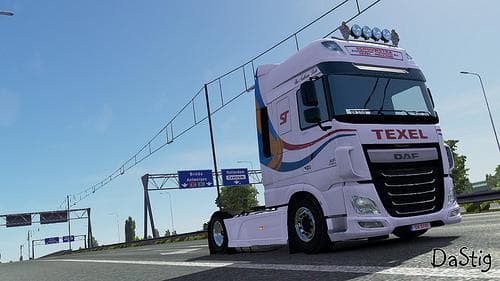
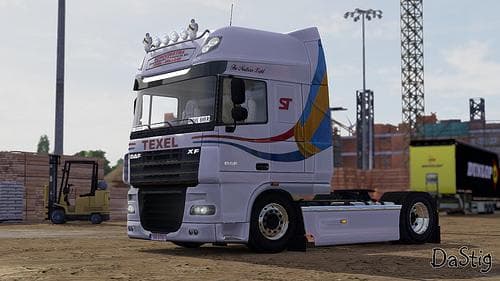
The DAF XF Jelle Schouwstra Skin Pack 1.22 is a skin mod for DAF XF & DAF XF Euro 6 trucks in Euro Truck Simulator 2 version 1.22. Created by Euro truck simulat
The DAF XF JELLE SCHOUWSTRA SKIN PACK 1.22 offers a set of custom paint jobs specifically designed for the DAF XF and DAF XF Euro 6 trucks in ETS2 version 1.22. Instead of altering the truck's shape or adding new parts, this mod changes the exterior appearance through unique skins that players can select in the paint shop. This kind of skin mod is a straightforward way to personalize your vehicle without affecting its performance or compatibility with other mods.
Skin mods like this one work by applying new textures over the existing truck model. Because they rely on the base vehicle, it's important to ensure you're using the correct version of ETS2 and have the matching truck model installed before loading these skins. They are generally compatible with other cosmetic mods but should be loaded after any mods that modify the base truck to avoid texture conflicts.
Integrating this skin pack into a modded setup is usually hassle-free as it doesn't interfere with gameplay mechanics or add new assets beyond textures. Players who use multiple visual mods often place skin packs later in their load order to make sure their designs appear correctly without being overwritten by other graphics enhancements.
This pack will appeal mostly to those looking for fresh looks on their DAF trucks, especially if you want something different from stock options but don't want to complicate your game with heavy modifications. It fits well for users who enjoy customizing their fleet's appearance and want an easy way to switch between styles depending on mood or route.
Since the creator is unknown and file size details aren't provided, it's wise to back up your profiles before installing any third-party skins and keep an eye on community feedback regarding stability and compatibility after updates.
How to install
1. Download the .scs file. 2. Drop it into `Documents/Euro Truck Simulator 2/mod/`. 3. Enable in Mod Manager. 4. Apply the skin in the truck/trailer paint shop.
After the mod loads, save your game inside a safe area (parking lot or service) before deciding whether to keep it. If the game refuses to load with the mod enabled, check that all required DLCs are installed and that the supported ETS2 version chips on this page include your installed game patch.
Reviews
No ratings yetNo reviews yet — be the first to rate this mod.





