DAF XF EURO 6 OBRULY V1.0
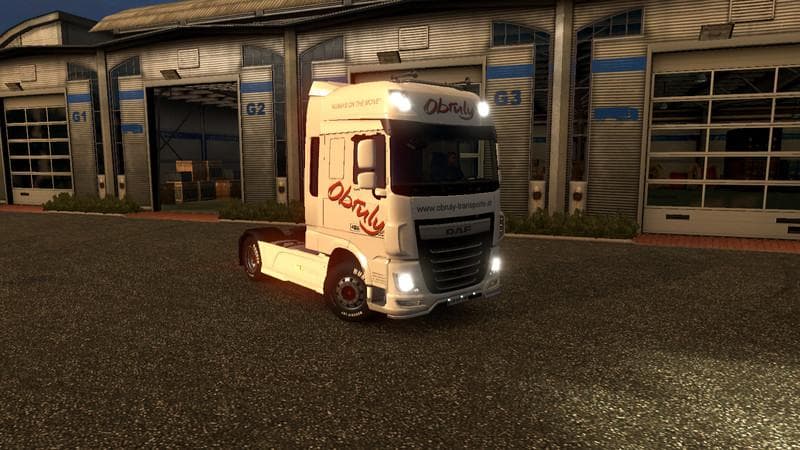
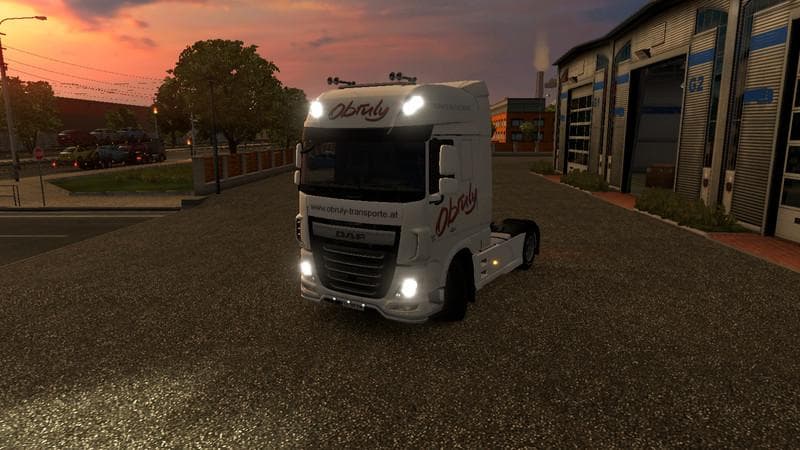
This mod is a skin for the DAF XF EURO 6 truck, version 1.0, created by Euro Truck Simulator 2. It features a design inspired by the company Obruly Transporte,
The DAF XF EURO 6 OBRULY V1.0 is a skin mod that changes the appearance of the DAF XF Euro 6 truck in Euro Truck Simulator 2. It repaints the truck to represent a fictional company named Obruly Transporte, which is described as a medium-sized transport company based in the southern region. This type of mod doesn't alter the truck's model or performance but focuses solely on visual customization.
Skin mods like this one are applied through the in-game paint shop and require you to own the base vehicle they were designed for. Since this repaint targets the DAF XF Euro 6, it will only work if you have that specific truck available in your garage. These skins offer an easy way to add variety and personal flair without modifying game mechanics or adding new models.
When incorporating skin mods into a modded setup, they generally load after map or gameplay mods since they only affect vehicle textures. It's a good idea to keep skins near the end of your mod list to avoid conflicts, especially if you use multiple skins for different trucks. Compatibility issues are rare with skins unless two try to repaint the same vehicle simultaneously.
This skin supports ETS2 version 1.0, so it fits older versions of the game rather than recent updates. Players running newer game versions may need to check compatibility or look for updated equivalents. Skins tend to be lightweight additions that won't impact game performance significantly but still enhance immersion by diversifying your fleet's look.
Truck enthusiasts who enjoy customizing their rigs with unique liveries will find this mod useful for adding a touch of authenticity and personality to their DAF trucks. Those building themed convoys or roleplaying transport companies can use it to help create consistent visuals across their vehicles.
How to install
1. Download the .scs file. 2. Drop it into `Documents/Euro Truck Simulator 2/mod/`. 3. Enable in Mod Manager. 4. Apply the skin in the truck/trailer paint shop.
After the mod loads, save your game inside a safe area (parking lot or service) before deciding whether to keep it. If the game refuses to load with the mod enabled, check that all required DLCs are installed and that the supported ETS2 version chips on this page include your installed game patch.
Reviews
No ratings yetNo reviews yet — be the first to rate this mod.