Custom Scania Vabis V8 Skin for RJL
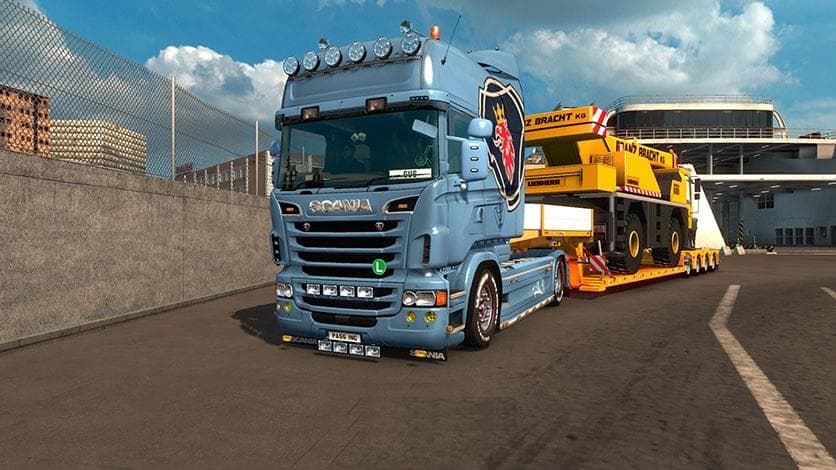
This mod is a custom Scania Vabis V8 skin for RJL trucks in Euro Truck Simulator 2. The creator has uploaded the correct version after an initial mistake, apolo
The Custom Scania Vabis V8 Skin for RJL is a repaint mod designed specifically for the Scania Vabis V8 truck model within Euro Truck Simulator 2. This skin doesn't alter the truck's physical structure or performance; instead, it offers a fresh visual appearance that players can apply in the paint shop. Skins like this one rely on the base vehicle being present and compatible to function correctly.
Skin mods in ETS2 serve as a way to personalize trucks without touching their core design. They provide an additional layer of customization by changing textures and colors, allowing users to reflect their own style or preferences. Applying a new skin can breathe new life into familiar vehicles, making long hauls feel less repetitive.
When integrating skin mods into a modded setup, it's essential to load them after any mods that change the same truck model to avoid conflicts. This ensures that the skin displays properly without being overwritten by other modifications. Given that this is a skin for the RJL Scania Vabis V8, it should be placed accordingly in your mod manager if you use multiple skins or related mods.
Players who enjoy tweaking their truck's look or who are fans of the Scania Vabis V8 will find this mod appealing. It suits those wanting more variety in their fleet visuals or those aiming for a specific aesthetic with their RJL trucks. Since no technical changes are involved, it won't impact gameplay but enhances immersion through appearance.
While details like version compatibility and file size aren't specified, users should always verify that their ETS2 version supports the base RJL Scania model before installing skins made for it. Keeping mods up to date and checking compatibility reduces issues during gameplay and ensures smooth operation.
How to install
1. Download the .scs file. 2. Drop it into `Documents/Euro Truck Simulator 2/mod/`. 3. Enable in Mod Manager. 4. Apply the skin in the truck/trailer paint shop.
After the mod loads, save your game inside a safe area (parking lot or service) before deciding whether to keep it. If the game refuses to load with the mod enabled, check that all required DLCs are installed and that the supported ETS2 version chips on this page include your installed game patch.
Reviews
No ratings yetNo reviews yet — be the first to rate this mod.





