CULINA LOGISTICS PACK
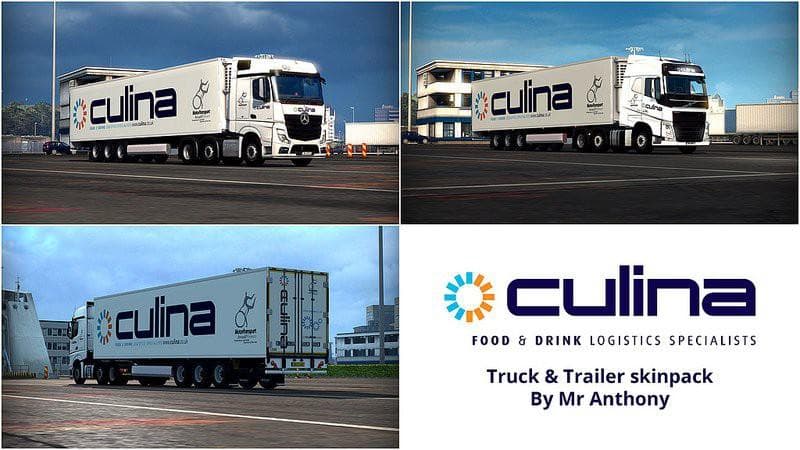
The Culina Logistics Pack is a skins mod for ETS2 featuring skins for Mercedes Actros MP4 and Volvo FH 2013, along with a standalone trailer. Created by Euro Tr
The CULINA LOGISTICS PACK is a skin mod designed for Euro Truck Simulator 2, featuring repaints for the Mercedes Actros MP4 and Volvo FH 2013 trucks, as well as a standalone trailer. This kind of mod doesn't alter the truck models themselves but changes their appearance, giving players a fresh look tied to the Culina Logistics branding. Skins like this one are applied through the paint shop in-game and require you to have compatible base vehicles already installed.
Skin mods in ETS2 are popular for personalizing your fleet without impacting gameplay mechanics or performance. Since they depend on existing truck models, it's crucial to ensure your game version matches what the mod supports—in this case, ETS2 version 1.21. Applying multiple skins can be straightforward, but pay attention to load order if you run other vehicle customization mods to avoid conflicts.
This particular pack fits well into a modded setup where realism or company branding is preferred. The inclusion of both trucks and a trailer offers consistency when hauling with Culina Logistics visuals. Because it uses standalone trailers alongside repainted trucks, it might require careful load placement if combined with other trailer mods.
Players who enjoy adding variety to their trucking experience by showcasing different company liveries will find this pack useful. It's especially appealing if you're running an ETS2 version around 1.21 and want to expand your fleet's visual options without overhauling game content.
While details about its creator remain unknown, the mod has been tested on version 1.21.1.2 of ETS2, suggesting decent stability for that patch level. If you're managing multiple skin packs or trailer mods, keep an eye on compatibility and make sure your base trucks match those required by the skin.
How to install
1. Download the .scs file. 2. Drop it into `Documents/Euro Truck Simulator 2/mod/`. 3. Enable in Mod Manager. 4. Apply the skin in the truck/trailer paint shop.
After the mod loads, save your game inside a safe area (parking lot or service) before deciding whether to keep it. If the game refuses to load with the mod enabled, check that all required DLCs are installed and that the supported ETS2 version chips on this page include your installed game patch.
Reviews
No ratings yetNo reviews yet — be the first to rate this mod.





