CONTAINER DOUBLE PACK SOMMER MAERSK GRONEWEGEN MATSON V2
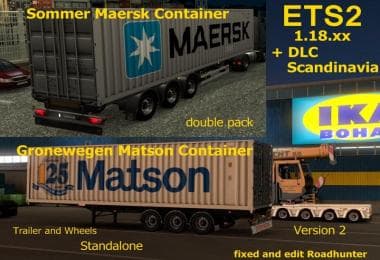
This mod adds a container double pack featuring Sommer, Maersk, Gronewegen, and Matson trailers to Euro Truck Simulator 2. Created by ETS2Mods, the mod was last
The CONTAINER DOUBLE PACK SOMMER MAERSK GRONEWEGEN MATSON V2 mod adds a pair of container trailers to Euro Truck Simulator 2. These trailers represent two types of 40-foot containers, one from Sommer Maersk and the other from Matson, mounted on Groenewegen chassis. Both trailers are standalone, meaning they function independently in the game without requiring other mods to operate alongside them.
Trailer mods like this one expand the variety of cargo and trailer bodies available for hauling across ETS2’s map. Players will find these containers available in the cargo market or at trailer dealers, offering fresh options for delivering freight. They come with a fixed wheel setup and realistic weight values around 20 tons each, fitting well into existing transport scenarios.
In a modded setup, container trailers such as these are generally compatible with most truck and trailer mods since they don't alter core gameplay files. However, it’s wise to load them after any general trailer packs or tuning mods to avoid conflicts, especially when multiple standalone trailers are installed. Their presence can enrich your haul choices without disrupting other add-ons.
This pack is suited for players who want more variety in their freight missions or enjoy transporting containerized goods within ETS2. Fans of Scandinavian or international shipping themes may appreciate how these models complement DLC environments like Scandinavia or the base map. They blend nicely whether you’re using official DLC content or extensive map expansions.
Overall, the mod fits smoothly into existing collections of trailer mods by adding specific branded containers that enhance realism. It’s not about changing gameplay mechanics but rather providing new visual and logistical options for those who like hauling different container types across Europe.
Installation typically involves placing the mod file into the ETS2 mod folder and activating it via the in-game menu. Since no exact supported game version is listed, checking compatibility with your current version before use is recommended to avoid issues.
How to install
1. Download the .scs file. 2. Drop it into `Documents/Euro Truck Simulator 2/mod/`. 3. Enable in Mod Manager. 4. Trailer should appear in cargo selection or trailer dealer depending on the mod's design.
After the mod loads, save your game inside a safe area (parking lot or service) before deciding whether to keep it. If the game refuses to load with the mod enabled, check that all required DLCs are installed and that the supported ETS2 version chips on this page include your installed game patch.
Reviews
No ratings yetNo reviews yet — be the first to rate this mod.