CHRIS MAXIMUS SCANIA T
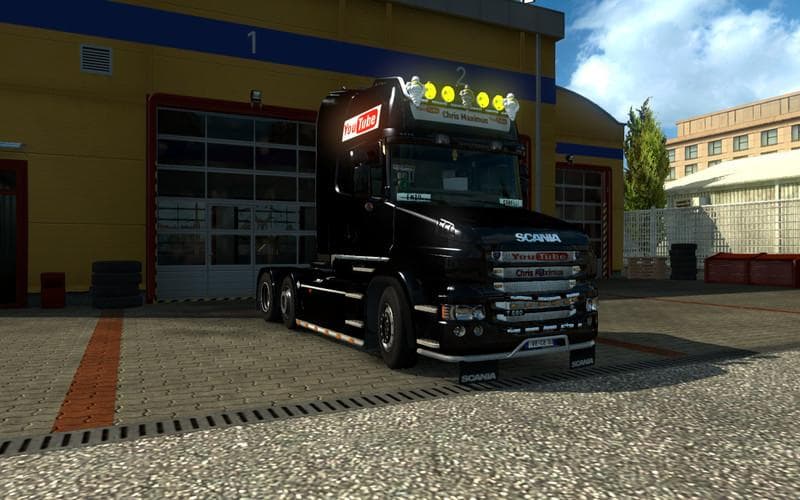
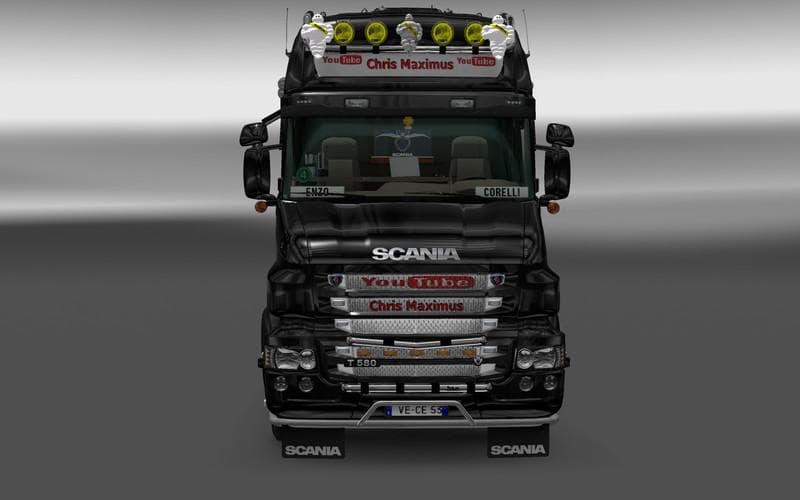
The CHRIS MAXIMUS SCANIA T is a skin mod designed specifically for the Scania T truck in Euro Truck Simulator 2. Instead of altering the model or adding new features, this type of mod changes the visual appearance by repainting the existing truck. Players can apply it in the paint shop, where skins like this one replace or add to the default look without affecting gameplay mechanics.
Skin mods such as this are straightforward additions that fit well into a modded ETS2 setup. Since they only modify textures on an existing truck, they generally don't conflict with other mods that change models or add trailers. However, it's good practice to load skins after any mods that alter the base vehicle to ensure the paint job displays correctly.
This particular skin supports ETS2 version 1.18, so compatibility with your game depends on running that or a compatible update. While details like file size and creator remain unknown, these kinds of mods typically require no special installation steps beyond placing files in the correct folder and activating them through the game's mod manager.
Players who enjoy customizing their trucks visually will find this mod appealing, especially those who prefer driving a Scania T. It offers a fresh look without modifying performance or gameplay balance, making it suitable for players focused on aesthetic personalization.
Since it’s purely cosmetic, this skin won't interfere with other gameplay-altering mods or map expansions. It's also easy to switch between different skins if you like variety or want to match your rig's theme across multiple vehicles.
Overall, CHRIS MAXIMUS SCANIA T fits well into setups aiming to refresh the appearance of familiar trucks while keeping everything else intact. If you’re into tweaking how your fleet looks without complicating your game with new models or parts, this kind of skin mod does exactly that.
How to install
1. Download the .scs file. 2. Drop it into `Documents/Euro Truck Simulator 2/mod/`. 3. Enable in Mod Manager. 4. Apply the skin in the truck/trailer paint shop.
After the mod loads, save your game inside a safe area (parking lot or service) before deciding whether to keep it. If the game refuses to load with the mod enabled, check that all required DLCs are installed and that the supported ETS2 version chips on this page include your installed game patch.
Reviews
No ratings yetNo reviews yet — be the first to rate this mod.





