CAT SKIN FOR THE K100
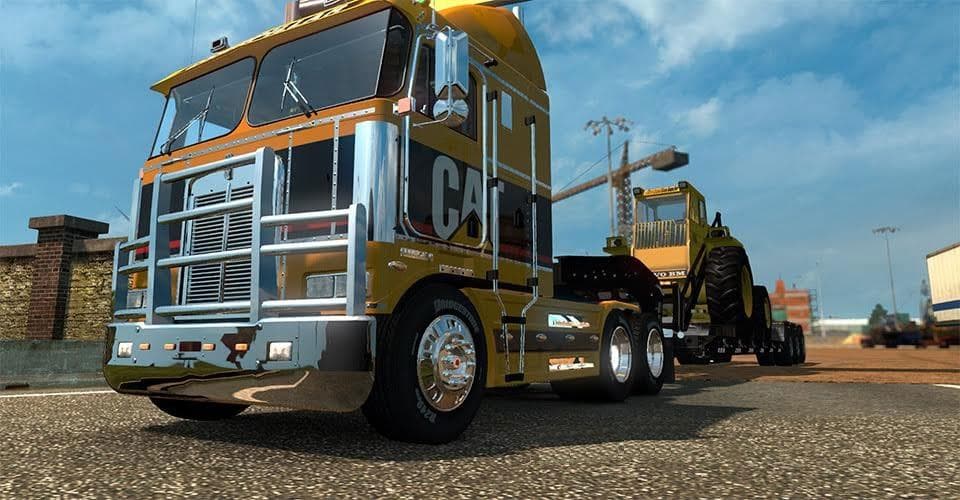
CAT SKIN FOR THE K100 is an ETS2 skins.
The CAT skin for the K100 offers a fresh paint job specifically designed for this classic truck model in Euro Truck Simulator 2. It's a follow-up to a similar design made for the K200, giving players another option to customize their vehicle’s appearance without altering the truck’s structure. Skins like this one are typically applied through the in-game paint shop and rely on the base vehicle they were created for, meaning you’ll need the K100 truck model installed to use it properly.
Skin mods in ETS2 don’t modify gameplay or add new vehicles; instead, they change how existing trucks or trailers look. This lets players personalize their fleet with unique liveries and color schemes that stand out on the road. Since skins only repaint the exterior, they usually have minimal impact on game performance and can be stacked with other types of mods such as sound packs or physics tweaks.
When adding skins to a modded setup, it’s good practice to keep track of load order, especially if multiple skin mods target the same truck model. Conflicts can happen if two skins try to overwrite each other’s files, so loading them carefully ensures your preferred paint job shows up correctly. This CAT skin fits well into collections where customization is key, offering a distinctive style without affecting other parts of your game.
Players who enjoy customizing specific truck models will find this mod appealing. It suits those who want to add personality to their K100 trucks or expand an existing collection of CAT-themed skins. While details about compatibility and version support aren't specified, most skins work fine across different ETS2 versions as long as the base model remains unchanged.
How to install
1. Download the .scs file. 2. Drop it into `Documents/Euro Truck Simulator 2/mod/`. 3. Enable in Mod Manager. 4. Apply the skin in the truck/trailer paint shop.
After the mod loads, save your game inside a safe area (parking lot or service) before deciding whether to keep it. If the game refuses to load with the mod enabled, check that all required DLCs are installed and that the supported ETS2 version chips on this page include your installed game patch.
Reviews
No ratings yetNo reviews yet — be the first to rate this mod.





