BUS MACROPOLO G7 1600LD MANCHESTER UNITED SKIN
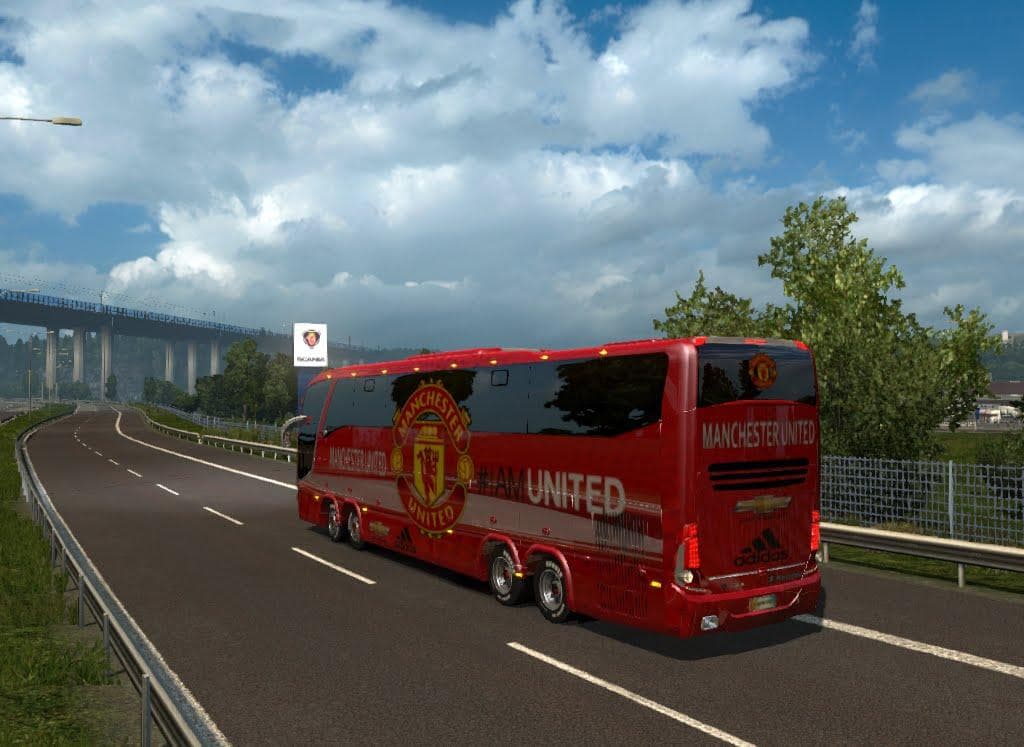
BUS MACROPOLO G7 1600LD MANCHESTER UNITED SKIN is an ETS2 unknown. Listed compatible with ETS2 1.18, 1.21.
The BUS MACROPOLO G7 1600LD MANCHESTER UNITED SKIN is a repaint mod designed for the Macropolo G7 LD 1600 bus model in Euro Truck Simulator 2. This particular skin applies a Manchester United-themed design, bringing a football club's style to the vehicle without altering its structure or performance. It’s intended for use with versions 1.18 through 1.21 of ETS2 and can be found in the Scania Truck Dealer within the game.
Skin mods like this one modify the visual appearance of existing vehicles by applying new textures and colors, usually through the paint shop interface. They don't affect gameplay mechanics or vehicle handling but add personalization options for players who want to customize their fleet with specific liveries or themes.
When adding skins to a modded setup, it’s useful to remember that they depend on the base model they were created for. In this case, you need to have the Macropolo G7 LD 1600 bus available in your game for this skin to work correctly. Skins generally load after models, so if you're running multiple mods, placing skins lower in the load order helps avoid conflicts.
This Manchester United skin fits well into themed collections or setups focused on sports clubs or unique liveries. Fans of football teams might enjoy seeing their favorite club represented on their in-game vehicles during road trips across Europe.
Since it's a skin mod rather than a gameplay change, compatibility issues are minimal as long as you match it with the correct bus model and supported ETS2 versions. Still, ensuring no other mods overwrite the same vehicle textures can prevent visual glitches.
Players looking to add variety and personal flair to their bus models will find this skin appealing. It offers a way to show support for Manchester United while driving around familiar routes in ETS2's extensive map.
How to install
1. Download the .scs file. 2. Drop it into `Documents/Euro Truck Simulator 2/mod/`. 3. Enable in Mod Manager. 4. Apply the skin in the truck/trailer paint shop.
After the mod loads, save your game inside a safe area (parking lot or service) before deciding whether to keep it. If the game refuses to load with the mod enabled, check that all required DLCs are installed and that the supported ETS2 version chips on this page include your installed game patch.
Reviews
No ratings yetNo reviews yet — be the first to rate this mod.





