BUS MACROPOLO G7 1600LD KF SKENDERBEU SKIN
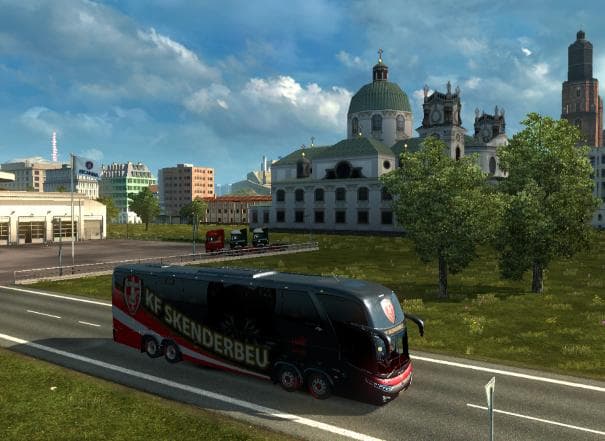
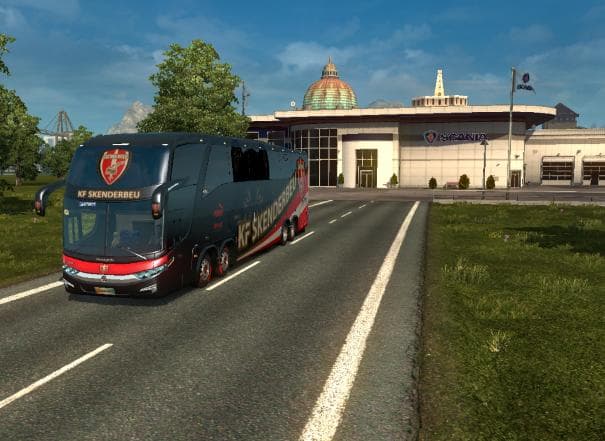
This skin mod adds the KF Skenderbeu Bus Macropolo G7 LD 1600 8x2 skin to ETS2, available at the Scania Truck Dealer. It has been tested on ETS2 versions 1.18 a
This mod offers a new skin for the BUS MACROPOLO G7 1600LD, tailored specifically with the KF Skenderbeu design. It applies a fresh paint job to this particular bus model, changing its appearance without altering any mechanical or structural elements. The skin can be selected in the Scania Truck Dealer within ETS2, making it easy to access once installed.
Skins like this one focus on repainting an existing vehicle model, providing variety and personalization options without affecting gameplay mechanics. They are typically applied through the paint shop interface and depend on having the matching base model already available in your game. Because it doesn’t replace or add new models, installation is usually straightforward and compatible with most setups.
This type of skin mod fits neatly into a modded setup where players want to customize vehicles but avoid conflicts that come with model replacements. Load order for skins generally isn’t complicated since they override textures rather than core files. However, it's advisable to ensure that no other skin mods are loaded afterward if you want this specific look to appear correctly.
The mod supports ETS2 versions 1.18 through 1.22, so compatibility with these game updates is accounted for. Users running mods for these versions will find it integrates without issue alongside other visual enhancements or gameplay modifications.
Players interested in adding unique visual touches to their buses will find this skin useful, especially if they enjoy collecting and displaying different liveries in their fleet. It’s a simple way to diversify appearances and bring some regional or thematic flavor into the game.
While creator details remain unknown, credit is given to Capricorn for this particular design. Skins like this tend to appeal mostly to those who enjoy detailed cosmetic customization rather than functional changes.
How to install
1. Download the .scs file. 2. Drop it into `Documents/Euro Truck Simulator 2/mod/`. 3. Enable in Mod Manager. 4. Apply the skin in the truck/trailer paint shop.
After the mod loads, save your game inside a safe area (parking lot or service) before deciding whether to keep it. If the game refuses to load with the mod enabled, check that all required DLCs are installed and that the supported ETS2 version chips on this page include your installed game patch.
Reviews
No ratings yetNo reviews yet — be the first to rate this mod.





