BMW X7 2023 v3.4 ETS2 - Euro Truck Simulator 2 Mods | American Truck Simulator Mods
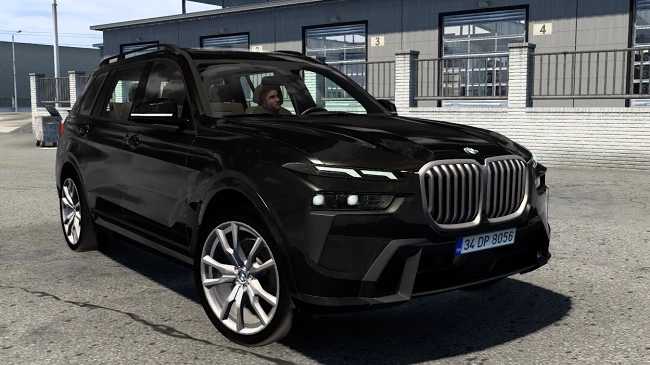
BMW X7 2023 is an ETS2 parts. Listed compatible with ETS2 1.60.
The BMW X7 2023 v3.4 mod for Euro Truck Simulator 2 brings parts and accessories themed around this luxury SUV into the game, tailored for version 1.60. While primarily a car model in reality, here it’s adapted as a parts mod, adding options like custom wheels and interior colors that can be applied through the truck customization menu. These types of mods usually enhance visual appeal and offer new tuning choices beyond what the base game provides.
Parts mods like this one generally focus on specific vehicle brands or models and are designed to fit within existing trucks' customization frameworks. They often include details such as new exterior features or interior finishes that players can select to personalize their driving experience. In this case, the mod includes two interior color schemes—black-gray and beige—as well as functional additions like opening front windows and a windshield wiper indicator, contributing to a more immersive setup.
When integrating parts mods into your Euro Truck Simulator 2 build, it’s wise to consider load order and compatibility. Since these mods add accessories rather than overhaul core gameplay or models extensively, they usually slot in without much trouble alongside other cosmetic or tuning mods. However, always check for conflicts with other parts targeting the same vehicle slots to avoid overlapping files or textures.
This mod suits players who enjoy detailed customization of their vehicles and appreciate subtle touches like original engine sounds or specific handling characteristics tailored to the BMW X7 profile here. Even if you’re primarily focused on trucks, adding such themed parts can diversify your garage's appearance and give your fleet a unique flair without altering gameplay mechanics dramatically.
How to install
1. Download the file(s) from the original source linked above. 2. Drop them into `Documents/Euro Truck Simulator 2/mod/`. 3. Enable in Mod Manager and restart the game.
After the mod loads, save your game inside a safe area (parking lot or service) before deciding whether to keep it. If the game refuses to load with the mod enabled, check that all required DLCs are installed and that the supported ETS2 version chips on this page include your installed game patch.
Reviews
No ratings yetNo reviews yet — be the first to rate this mod.