Bitdefender skin for Peterbilt 579
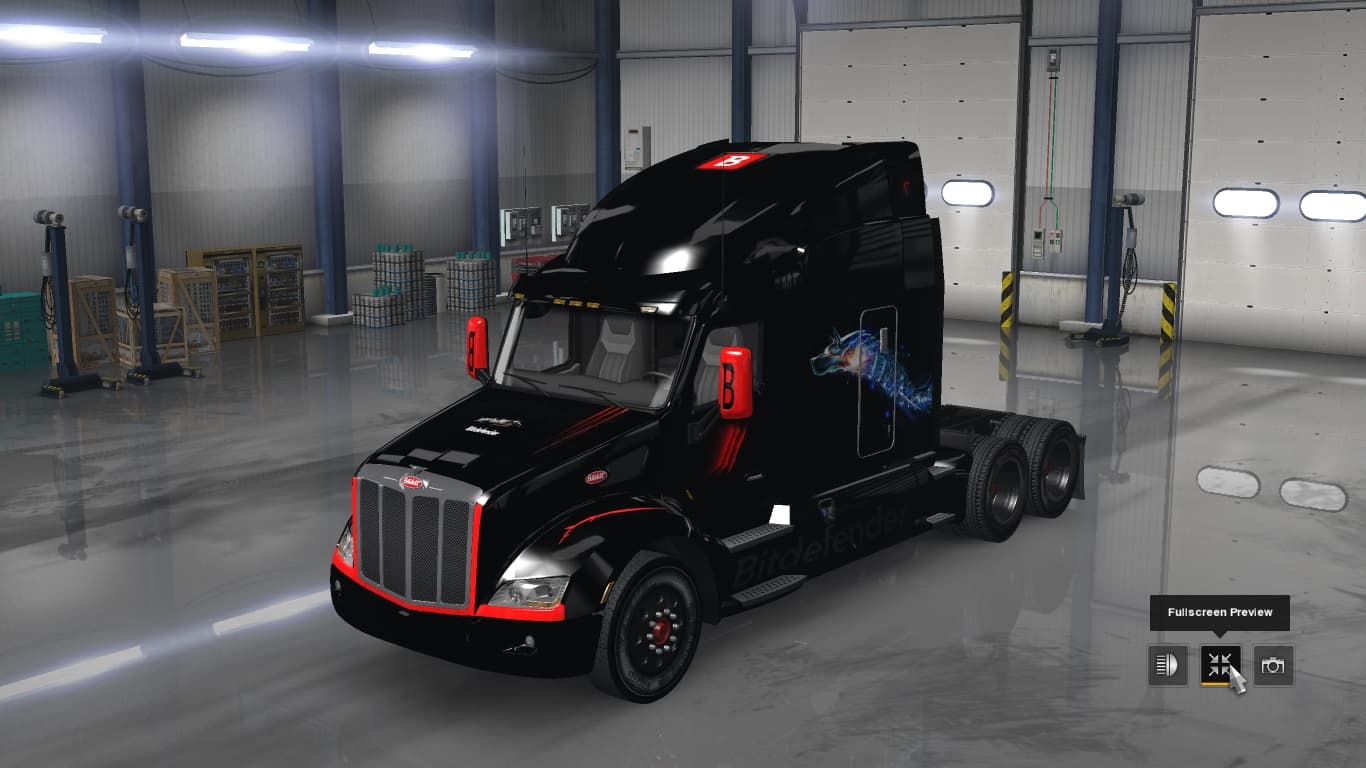
This mod offers a custom metallic paint job for the Peterbilt 579 in Euro Truck Simulator 2. Created by Adyx50, the skin is available for download on Sharemods
The Bitdefender skin for Peterbilt 579 offers a fresh paint job for this particular truck model in Euro Truck Simulator 2. It doesn't alter the truck's structure or features but changes the visual appearance, focusing on a metallic finish that gives the Peterbilt 579 a distinctive look. This type of mod fits directly into the paint shop section of the game, where players can customize their trucks' looks with various skins.
Skin mods like this one are straightforward additions that repaint existing vehicles without affecting gameplay mechanics or performance. They rely on the base vehicle being present in the game, so you'll need to have the Peterbilt 579 available to apply this skin. Skins enhance immersion by allowing players to personalize their trucks beyond default options.
When using multiple mods, especially skins, load order typically isn’t as critical compared to gameplay-altering mods, but it's still wise to place skins after any mods that modify truck models or parts to avoid conflicts. Compatibility is generally good since skins only affect textures and colors rather than model data or physics.
This Bitdefender-themed paint job is suitable for players who want a unique metallic look for their Peterbilt 579 without switching models or adding complex modifications. It fits well in setups where visual customization is preferred over functional changes and blends easily with other cosmetic mods.
Because details like version compatibility and file size aren't specified, it's recommended to test this skin with your current ETS2 setup cautiously. Keeping backups before adding new skins is always a good practice if you're running several mods simultaneously.
How to install
1. Download the .scs file. 2. Drop it into `Documents/Euro Truck Simulator 2/mod/`. 3. Enable in Mod Manager. 4. Apply the skin in the truck/trailer paint shop.
After the mod loads, save your game inside a safe area (parking lot or service) before deciding whether to keep it. If the game refuses to load with the mod enabled, check that all required DLCs are installed and that the supported ETS2 version chips on this page include your installed game patch.
Reviews
No ratings yetNo reviews yet — be the first to rate this mod.





