ASPHALT 8 TRAFFIC PACK
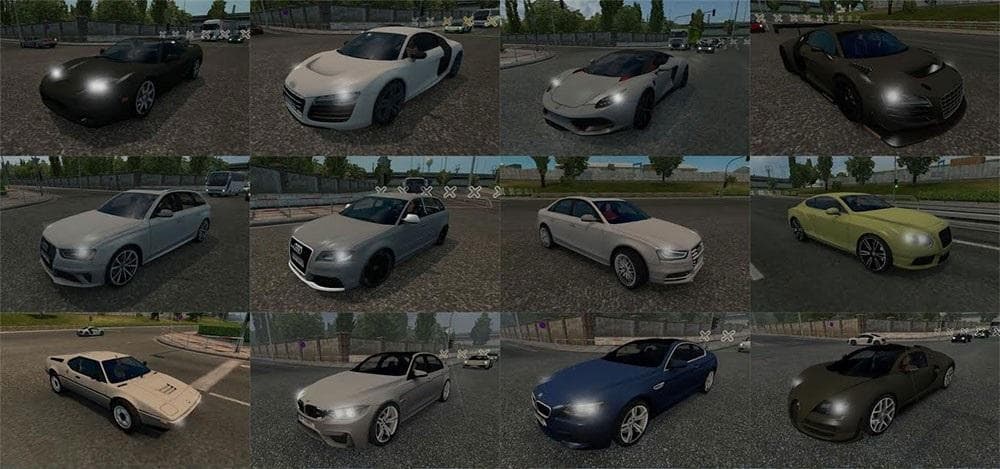
ASPHALT 8 TRAFFIC PACK is an ETS2 traffic.
This mod brings a selection of cars from Asphalt 8 into Euro Truck Simulator 2, including models like the Acura NSX '06 and Audi R8 variations. It adds a bit of variety to the traffic environment by introducing vehicles not typically found in ETS2's standard lineup. Mods like this one usually replace or add to existing traffic AI, making your in-game world feel less predictable and more interesting as you drive through various regions.
Traffic mods such as this are generally installed via the in-game Mod Manager, where you can activate or deactivate them without much hassle. They work alongside other mods that alter game visuals or traffic behavior but should be loaded with some care to avoid conflicts—especially if you have several mods affecting AI vehicles or road conditions. Load order can matter; putting traffic packs higher up often helps ensure their models appear correctly.
Since it falls under the 'other' category, this mod doesn't target specific trucks or maps but enriches the general driving experience by changing what kinds of cars share the roads with your truck. Players who enjoy seeing a broader range of vehicle types while delivering cargo may find this mod adds a touch of extra immersion, particularly on heavily trafficked routes through countries like Germany or France.
While details about compatibility or supported ETS2 versions aren't available, these sorts of vehicle addition mods tend to work well across multiple game versions as long as they're updated accordingly. Always back up your profiles before adding new content, just in case there are unexpected issues with game updates or other mods installed.
This pack suits players looking to diversify their traffic with sportier and less common car models rather than sticking solely to typical European sedans and trucks. If you're running map expansions or graphical enhancement mods and want your highways populated with something different, then incorporating this Asphalt 8 themed traffic pack could refresh your daily drives.
How to install
1. Download the file(s) from the original source linked above. 2. Drop them into `Documents/Euro Truck Simulator 2/mod/`. 3. Enable in Mod Manager and restart the game.
After the mod loads, save your game inside a safe area (parking lot or service) before deciding whether to keep it. If the game refuses to load with the mod enabled, check that all required DLCs are installed and that the supported ETS2 version chips on this page include your installed game patch.
Reviews
No ratings yetNo reviews yet — be the first to rate this mod.





