ADVISER WARNING ICONS IN COLOR
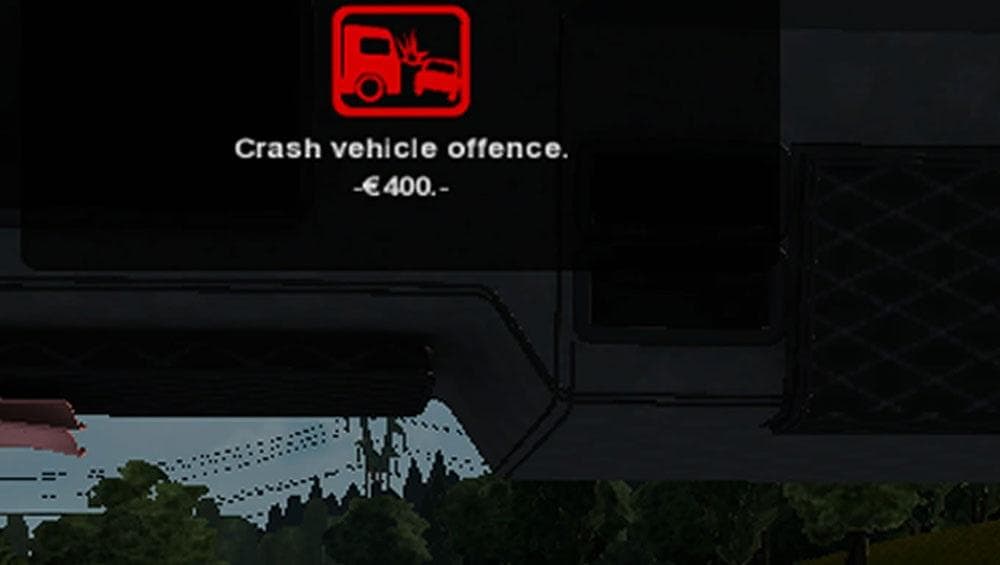
This mod adds color-coded warning icons to the adviser in ETS2, such as red for crashes and driving through red lights. It enhances gameplay by providing visual
This mod changes the adviser warning icons in Euro Truck Simulator 2 by adding color to them, making critical alerts like crashes or running red lights more noticeable. Instead of the usual monochrome symbols, these icons stand out when triggered, providing clearer visual cues during gameplay. It's a subtle tweak that can improve how you monitor your driving status without altering gameplay mechanics.
Sound mods in ETS2 typically replace or enhance audio elements such as engine noises, horns, or environmental sounds. While this particular mod focuses on visual warning icons rather than sounds themselves, it’s categorized alongside sound mods because it includes files related to alerts and notifications. Such mods usually require priority in the load order, placed above truck-specific mods to ensure their effects are applied properly.
When integrating this mod into a setup with other modifications, it's wise to place it higher up in the load list so that its changes to warning indicators take effect before other mods potentially override them. Compatibility is generally straightforward since it modifies user interface elements tied to warnings rather than core vehicle behavior or map data.
Players who want a clearer and more immediate way to spot critical warnings while driving may appreciate what this mod offers. It’s especially useful for those who prefer strong visual signals for incidents like crashes or traffic violations, helping reduce missed alerts during long hauls or intense driving sessions.
How to install
1. Download the .scs file. 2. Drop it into `Documents/Euro Truck Simulator 2/mod/`. 3. Enable in Mod Manager. Sound mods usually need to load **above** truck mods in load order. 4. Restart the game so the audio engine picks up new samples.
After the mod loads, save your game inside a safe area (parking lot or service) before deciding whether to keep it. If the game refuses to load with the mod enabled, check that all required DLCs are installed and that the supported ETS2 version chips on this page include your installed game patch.
Reviews
No ratings yetNo reviews yet — be the first to rate this mod.





