WEATHER IMPROVEMENTS V2.1 FOR PROMODS V2.0
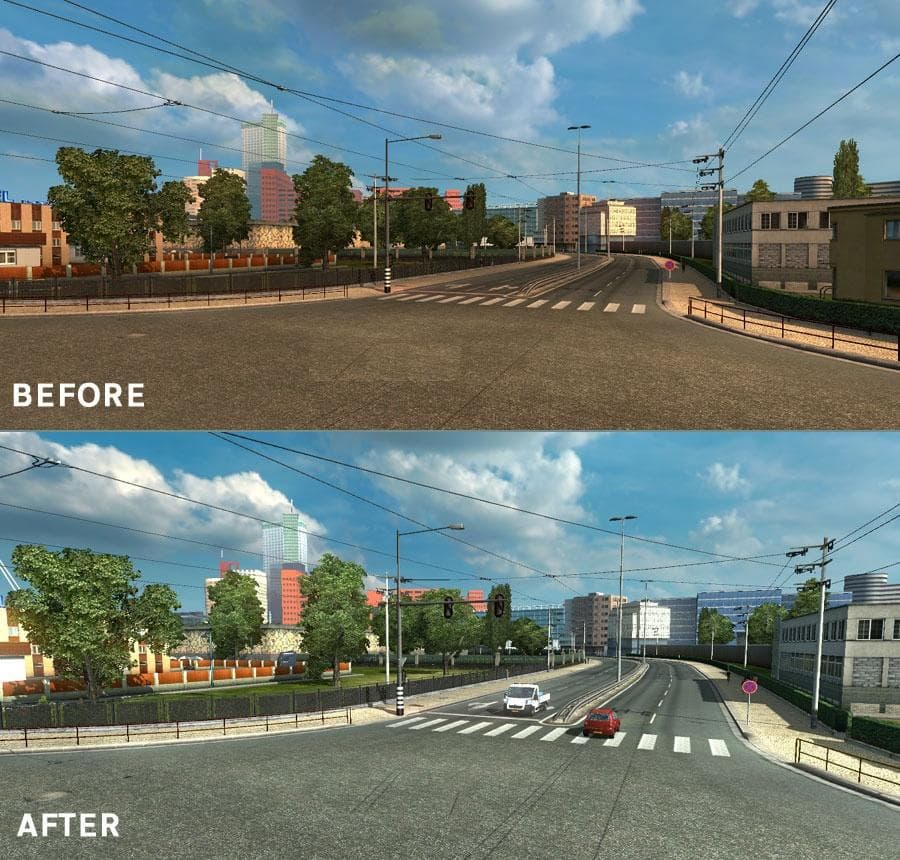
Weather Improvements for ProMods 2.1 by Euro Truck Simulator 2 enhances weather effects in version 1.22, with reduced shading on clouds, less blue haze, brighte
This mod, Weather Improvements v2.1 for ProMods 2.0, targets the weather effects within the ProMods map expansion for Euro Truck Simulator 2 version 1.22. It tweaks how lighting and atmospheric conditions appear across the extensive new areas introduced by ProMods, aiming to adjust cloud shadows, blue haze, and overall brightness levels for both day and night cycles.
Map mods like ProMods significantly broaden ETS2's playable world by adding new roads, cities, and regions. Weather-focused mods in this category don't alter geography but refine the environmental visuals you experience while driving these expanded routes. They're usually loaded after the main map files to ensure their visual changes take effect correctly.
Since this weather mod is designed specifically for ProMods 2.0 on ETS2 version 1.22, it's important to keep your setup consistent with those versions to avoid conflicts or unexpected behavior. Load order matters here; it should come after ProMods in your mod list so it can override default weather parameters without issue.
For players invested in a heavily modded map setup featuring ProMods, this kind of enhancement can improve immersion by making light and shadow conditions feel more balanced and natural. The adjustments to bright days and black nights help reduce overly harsh contrasts or excessive haze that might distract from driving or scenery appreciation.
Anyone who enjoys long hauls across the expansive European and adjacent territories of ProMods will find value in subtle but noticeable improvements to weather visuals. It’s not about drastic changes but about fine-tuning how light interacts with clouds and atmosphere during different times of day.
Overall, if you run ProMods 2.0 on ETS2 1.22 and want a slightly refined visual experience when it comes to weather effects—without changing gameplay or map layout—this mod fits neatly into that niche.
How to install
1. Download every .scs file from the source page (map mods often ship multiple files). 2. Copy all files to `Documents/Euro Truck Simulator 2/mod/`. 3. Enable each file in Mod Manager **in the order documented by the modder**. Load order matters for maps. 4. Start a new save or use an existing save that already supports the map's base regions.
After the mod loads, save your game inside a safe area (parking lot or service) before deciding whether to keep it. If the game refuses to load with the mod enabled, check that all required DLCs are installed and that the supported ETS2 version chips on this page include your installed game patch.
Known conflicts
No conflicts reported for this mod yet. Running a big mod list? Check your whole setup for conflicts →
Reviews
No ratings yetNo reviews yet — be the first to rate this mod.





