Temporary 1.22 Vegetation Patch For Maps
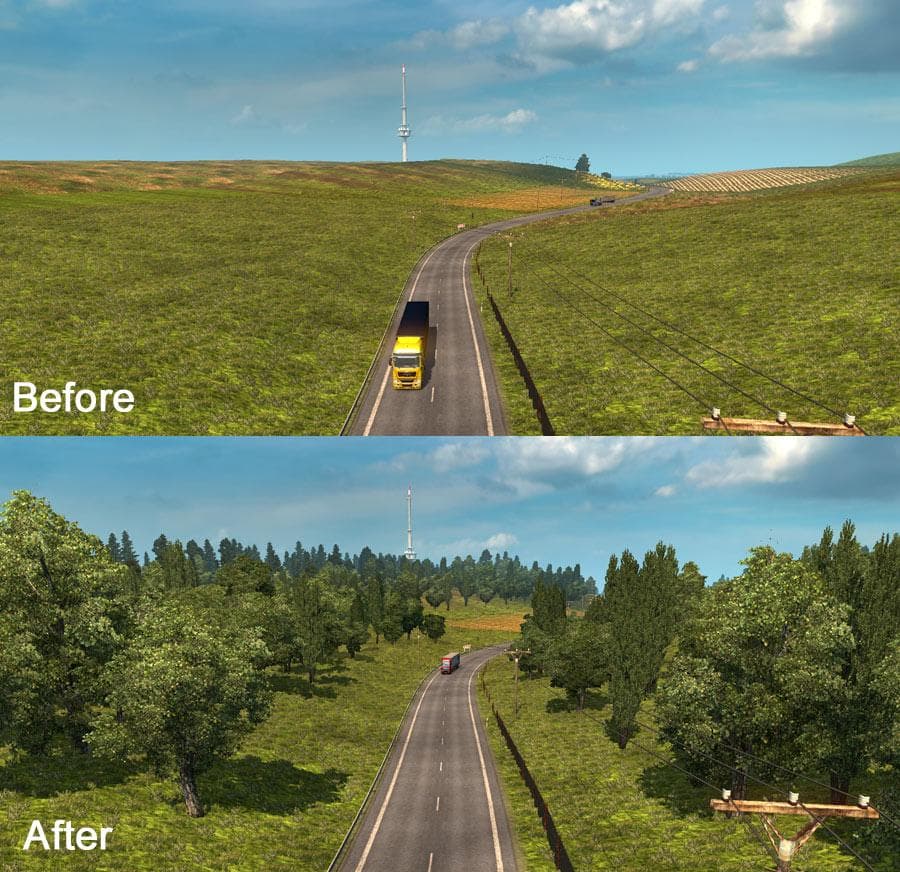
The Temporary 1.22 Vegetation Patch For Maps mod addresses vegetation issues caused by the 1.22 update. It should be placed above other maps in the Mod Manager
The Temporary 1.22 Vegetation Patch For Maps is designed to address missing vegetation problems that appeared after the ETS2 1.22 update. This type of mod usually serves as a quick fix, restoring trees, grass, and other plant life that might not be displaying correctly on various map mods. Since it’s a patch, it doesn’t add new roads or cities but rather focuses on the visual aspects of existing maps.
Map mods in Euro Truck Simulator 2 often come with their own unique environments, including terrain details like vegetation. When game updates change how these details are handled, patches like this become necessary to keep the landscape looking consistent and immersive. These patches typically need to be loaded above your main map mods in the Mod Manager to work properly.
Because this patch targets issues caused by the 1.22 game update, it’s important to match your ETS2 version accordingly. It supports only version 1.22 and should be placed above other map mods to ensure that the vegetation fixes take precedence over any conflicting files. Using it alongside popular regional maps can help maintain a natural look across areas such as Germany, France, or Spain.
For players running multiple map expansions or custom maps, keeping an eye on load order is key when using this kind of patch. It won’t function correctly if placed below other map files that override vegetation textures or models. Also, since it’s a temporary solution made specifically for 1.22 compatibility issues, you may want to remove or update it when newer versions of either ETS2 or your maps become available.
This mod suits those who have noticed sparse or missing greenery after updating ETS2 to version 1.22 and want a straightforward fix without reinstalling entire map packs. It helps maintain immersion by restoring essential environmental elements across various landscapes without altering gameplay routes or adding new content.
How to install
1. Download every .scs file from the source page (map mods often ship multiple files). 2. Copy all files to `Documents/Euro Truck Simulator 2/mod/`. 3. Enable each file in Mod Manager **in the order documented by the modder**. Load order matters for maps. 4. Start a new save or use an existing save that already supports the map's base regions.
After the mod loads, save your game inside a safe area (parking lot or service) before deciding whether to keep it. If the game refuses to load with the mod enabled, check that all required DLCs are installed and that the supported ETS2 version chips on this page include your installed game patch.
Known conflicts
No conflicts reported for this mod yet. Running a big mod list? Check your whole setup for conflicts →
Reviews
No ratings yetNo reviews yet — be the first to rate this mod.





