SOUTH KOREA ADVENTURE MAP V5.1
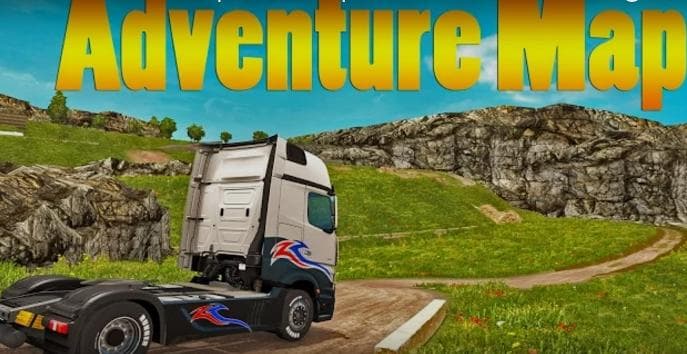
SOUTH KOREA ADVENTURE MAP is an ETS2 maps.
The SOUTH KOREA ADVENTURE MAP V5.1 is a map mod that introduces new landscapes and roads centered around South Korea, enhancing the driving experience with offroad sections and more complex routes. This version includes improvements to the terrain as well as fixes for some map-related issues, especially in areas with complicated road layouts. Map mods like this one typically add new regions or overhaul existing ones, expanding the area you can explore beyond the base game.
In Euro Truck Simulator 2, map mods come as .scs files that you place in the mod folder. They usually require careful attention to load order since conflicts or bugs can occur if multiple maps overlap or clash with base content. Players often need to use a fresh profile or have certain DLCs installed depending on how extensive the map changes are. Although specifics aren't provided here, it's wise to back up your profile before adding major map expansions.
Adding a South Korea-themed map offers a unique flavor compared to more common European or North American settings found in many mods. It fits well into setups where players want diverse locations or prefer exploring less typical trucking environments. The focus on offroad and complex roads suggests it might challenge drivers looking for more varied terrain and route complexity beyond standard highways.
This type of mod appeals mostly to those who enjoy exploring unfamiliar territories within ETS2 and like having an expanded world to drive through. If you’re into discovering detailed landscapes outside of Europe’s usual scope or want a different kind of map challenge, this could be worth trying out. Keep in mind that compatibility with other map mods should be checked beforehand to avoid issues during gameplay.
How to install
1. Download every .scs file from the source page (map mods often ship multiple files). 2. Copy all files to `Documents/Euro Truck Simulator 2/mod/`. 3. Enable each file in Mod Manager **in the order documented by the modder**. Load order matters for maps. 4. Start a new save or use an existing save that already supports the map's base regions.
After the mod loads, save your game inside a safe area (parking lot or service) before deciding whether to keep it. If the game refuses to load with the mod enabled, check that all required DLCs are installed and that the supported ETS2 version chips on this page include your installed game patch.
Known conflicts
No conflicts reported for this mod yet. Running a big mod list? Check your whole setup for conflicts →
Reviews
No ratings yetNo reviews yet — be the first to rate this mod.





