SKO FORWARDING WANDT VOLKSWAGEN V1.0
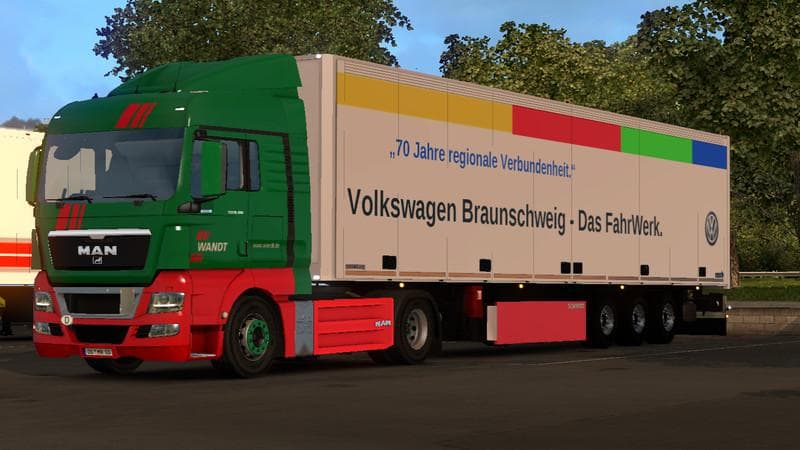
This mod adds the SKO Forwarding Wandt Volkswagen trailer to ETS2, with a skin designed by TZ_Rommi. The trailer is fully detailed and suitable for version 1.0
The SKO FORWARDING WANDT VOLKSWAGEN V1.0 is a trailer mod for Euro Truck Simulator 2 that introduces a Schmitz SKO trailer featuring a Volkswagen-themed skin and branding from a shipping company. This mod adds a new trailer option to the game, allowing players to haul cargo with a distinct look tied to recognizable brands within the trucking world. Trailer mods like this one expand the variety of haulable trailers you can find in the cargo market or purchase from dealers, enhancing the diversity of your fleet.
Trailer mods typically integrate smoothly into ETS2 by adding unique models that appear alongside default trailers during gameplay. Since this mod supports ETS2 version 1.0, it fits older setups but may require compatibility checks if used with newer versions or alongside other mods altering trailers or skins. Generally, these types of mods should be loaded after map mods and before any global texture packs to prevent conflicts and maintain visual consistency.
This kind of trailer is well-suited for players who enjoy customizing their transport experience with branded equipment or who want to add some variety to their cargo runs beyond standard trailers. The Volkswagen skin ties the trailer nicely to real-world companies, giving an added touch of authenticity for those focused on immersion.
When incorporating it into a heavily modded environment, users should watch out for potential clashes with other skin packs or trailer replacements that might overwrite textures or model files. Keeping an eye on load order helps avoid visual glitches or missing textures.
Overall, the SKO FORWARDING WANDT VOLKSWAGEN offers a solid addition for those looking to broaden their collection of haulable trailers with some brand-specific styling. It fits naturally into fleets aiming for a more realistic trucking atmosphere within ETS2.
How to install
1. Download the .scs file. 2. Drop it into `Documents/Euro Truck Simulator 2/mod/`. 3. Enable in Mod Manager. 4. Trailer should appear in cargo selection or trailer dealer depending on the mod's design.
After the mod loads, save your game inside a safe area (parking lot or service) before deciding whether to keep it. If the game refuses to load with the mod enabled, check that all required DLCs are installed and that the supported ETS2 version chips on this page include your installed game patch.
Reviews
No ratings yetNo reviews yet — be the first to rate this mod.





