SCHROTHS KORNSAFT TRAILER SKIN V1
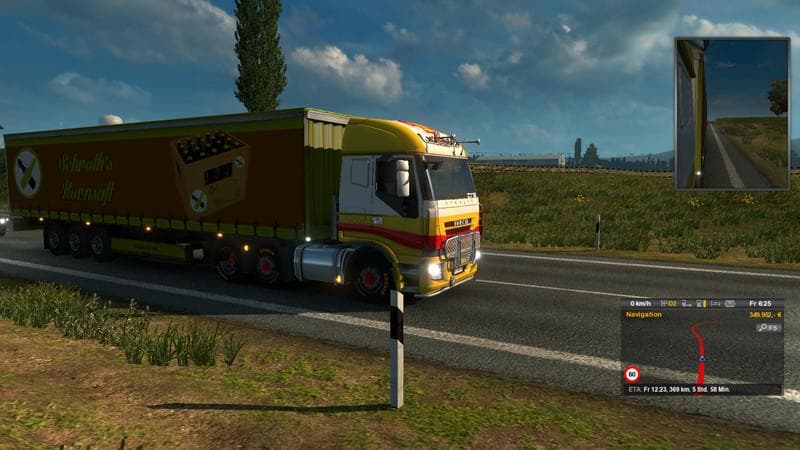
This mod adds a fantasy company "Schroth corn juice" trailer skin that replaces all trailers for the in-game company "Euro Acres". Created by Euro Truck Simulat
SCHROTHS KORNSAFT TRAILER SKIN V1 is a trailer skin mod for Euro Truck Simulator 2 that swaps out the default Euro Acres company trailers with ones branded as Schroth corn juice. Rather than altering the trailer models themselves, it applies a new paint job to existing trailers, which is typical of skin mods in ETS2. These types of mods customize the look of vehicles without affecting their shape or physics.
Skins like this one are installed by placing the mod file in the ETS2 mod folder and then activating it through the game's mod manager. They only affect visual aspects and don't interfere with gameplay mechanics, making them straightforward to use alongside other mods. This particular mod replaces all trailers linked to Euro Acres, so if you have multiple trailer mods that alter the same company or model, load order might influence which skin appears.
In a heavily modded setup, skins are often compatible with various map expansions and truck mods since they don't change core data files but only repaint textures. However, conflicts can arise if two skins target the same base trailer simultaneously. It's advisable to check your active mods to prevent overlapping skins from causing unexpected visuals.
Players who enjoy customizing their fleet's appearance will appreciate this kind of trailer skin. It adds variety to your cargo hauls by introducing different branding without requiring new models or affecting performance. Those who like thematic consistency across their trailers may find this mod fits well into a farm or agricultural-themed convoy.
Overall, SCHROTHS KORNSAFT TRAILER SKIN V1 suits users looking for simple visual changes to existing trailers in ETS2. It provides an alternative company branding option for Euro Acres trailers and integrates easily into most setups where skins are used.
How to install
1. Download the .scs file. 2. Drop it into `Documents/Euro Truck Simulator 2/mod/`. 3. Enable in Mod Manager. 4. Apply the skin in the truck/trailer paint shop.
After the mod loads, save your game inside a safe area (parking lot or service) before deciding whether to keep it. If the game refuses to load with the mod enabled, check that all required DLCs are installed and that the supported ETS2 version chips on this page include your installed game patch.
Reviews
No ratings yetNo reviews yet — be the first to rate this mod.