SCANIA T RJL WOOD WOLF SKIN
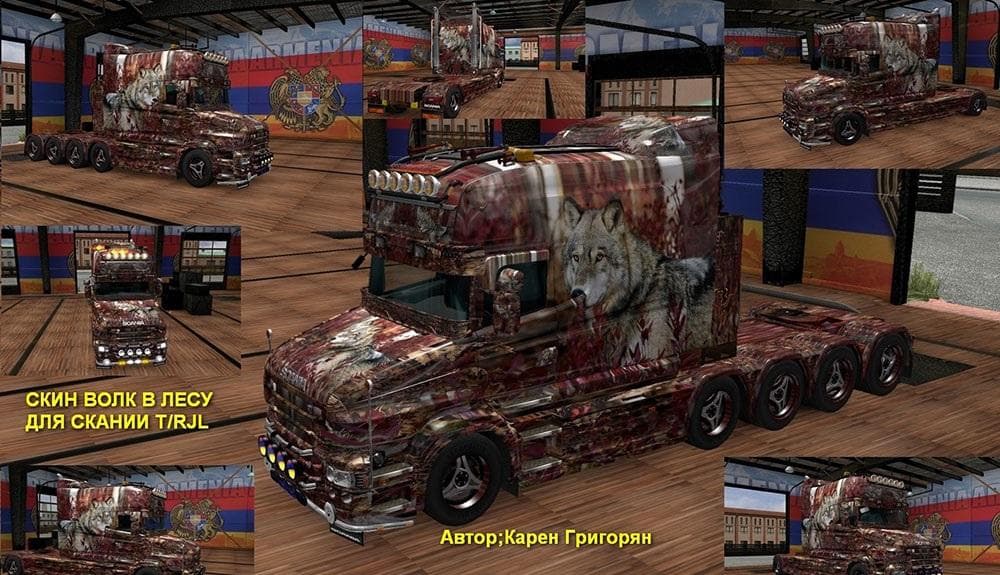
This mod offers a Wood Wolf skin for the Scania T RJL truck in ETS2 version 1.22. Created by Euro Truck Simulator 2, the creator credits go to Карен Григорян.
The SCANIA T RJL WOOD WOLF SKIN is a repaint mod designed specifically for the Scania T RJL truck in Euro Truck Simulator 2. It offers a new visual style without altering the truck's model or performance. Skins like this one are applied through the in-game paint shop and rely on the original vehicle they were created for, meaning you’ll need the base Scania T RJL to use this skin properly.
Skin mods are popular among players who want to personalize their trucks or match a particular theme without affecting gameplay mechanics. Since this skin is tested with ETS2 version 1.22, it fits well within setups running that version or close to it. However, users should always check compatibility with other mods, especially if multiple skins or vehicle modifications are involved.
In a modded environment, skins typically load after any truck model mods but before external additions like sound packs or map expansions. This helps avoid conflicts and ensures your chosen appearance displays correctly. If you use several skins, managing their load order is crucial to prevent one from overriding another unintentionally.
Players who enjoy customizing their rigs visually will appreciate this skin for its unique look on the Scania T RJL. It suits those who want something different from the standard paint options without changing game balance or adding extra features. The Wood Wolf design adds character while keeping things straightforward.
Overall, the SCANIA T RJL WOOD WOLF SKIN is a straightforward way to give your Scania T RJL a fresh coat of paint in ETS2 1.22. It's ideal for anyone running that truck model and looking for a subtle change in appearance rather than gameplay alterations.
How to install
1. Download the .scs file. 2. Drop it into `Documents/Euro Truck Simulator 2/mod/`. 3. Enable in Mod Manager. 4. Apply the skin in the truck/trailer paint shop.
After the mod loads, save your game inside a safe area (parking lot or service) before deciding whether to keep it. If the game refuses to load with the mod enabled, check that all required DLCs are installed and that the supported ETS2 version chips on this page include your installed game patch.
Reviews
No ratings yetNo reviews yet — be the first to rate this mod.