SCANIA T FOR STREAMLINE SKIN
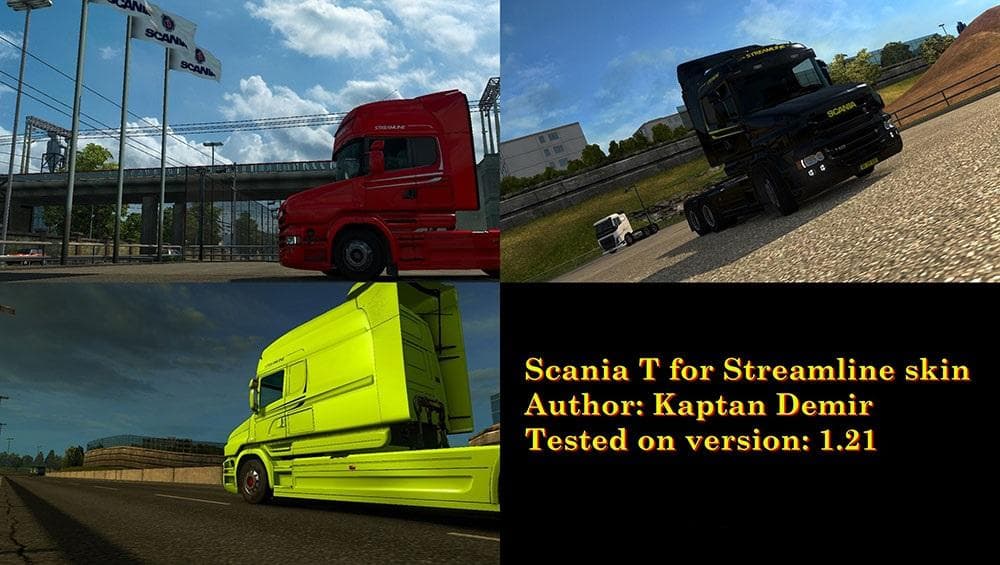
This skin mod for Scania T Streamline is designed for ETS2 version 1.21.1, with cabin skin edits included. Created by Euro Truck Simulator 2, the file size is 3
The SCANIA T FOR STREAMLINE SKIN is a paint job designed specifically for the Scania T Streamline cabin in Euro Truck Simulator 2. It changes the truck's appearance without modifying the model itself, offering a fresh look by repainting the vehicle in a different style. This type of mod is purely cosmetic and can be applied through the game's paint shop interface, as it relies on the original truck model to function.
Skin mods like this one don't alter gameplay but allow players to customize their trucks’ aesthetics. Since it’s made for the Scania T Streamline, you’ll need that base vehicle installed to use this skin properly. These mods are popular among players who want their trucks to stand out or better match their preferred style while driving across ETS2’s expansive map.
When incorporating skins into a modded setup, they usually load after map or gameplay mods since they only affect visuals. Conflicts are rare unless multiple skins target the same cabin simultaneously. It's always good practice to check load order and keep backups if you experiment with various paint jobs on your Scania trucks.
This skin was tested on ETS2 version 1.21, so compatibility with later versions might vary. Players running older versions close to 1.21 should find no issues using it, but those on much newer updates may need to look for alternative options or wait for updates from mod creators.
Drivers who enjoy personalizing their fleet will appreciate adding new skins like this one to diversify their garage's appearance. It fits well within any visually focused mod collection and helps keep your favorite Scania T looking unique during long hauls.
Overall, if you have the Scania T Streamline and want some variety beyond standard colors, this skin offers an easy way to refresh your truck’s look without changing its performance or handling.
How to install
1. Download the .scs file. 2. Drop it into `Documents/Euro Truck Simulator 2/mod/`. 3. Enable in Mod Manager. 4. Apply the skin in the truck/trailer paint shop.
After the mod loads, save your game inside a safe area (parking lot or service) before deciding whether to keep it. If the game refuses to load with the mod enabled, check that all required DLCs are installed and that the supported ETS2 version chips on this page include your installed game patch.
Reviews
No ratings yetNo reviews yet — be the first to rate this mod.





