SCANIA STREAMLINE GREEN EAGLE SKIN
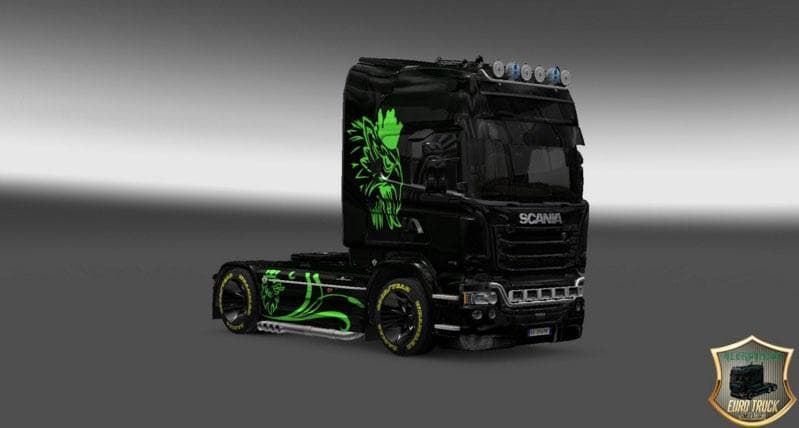
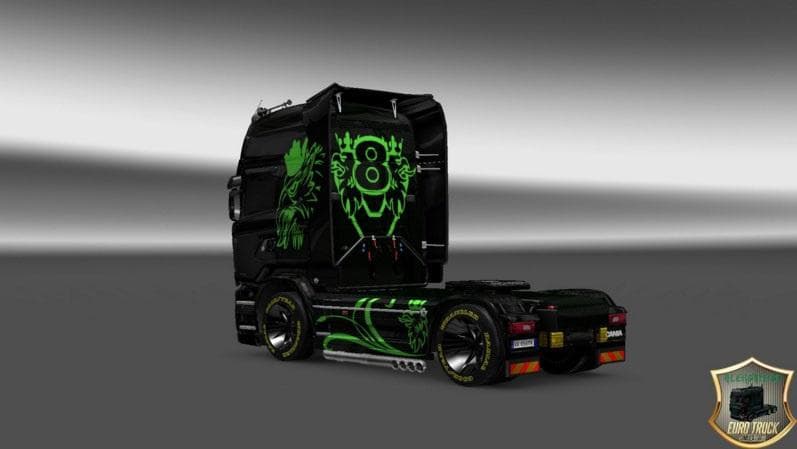
This mod is a Green Eagle Skin for the Scania Streamline truck in ETS2 version 1.21. Created by Euro Truck Simulator 2, the file size is 102 KB and can be downl
The SCANIA STREAMLINE GREEN EAGLE SKIN is a paint job designed for the Scania Streamline truck model in Euro Truck Simulator 2. This mod changes the truck’s exterior look by applying a green-themed eagle design, giving your vehicle a fresh appearance without altering its shape or performance. It works with ETS2 version 1.21 and must be applied through the game's paint shop interface where skins are selected.
Skin mods like this one function by repainting an existing truck model rather than introducing new models or parts. They rely on the base vehicle being present and compatible, so you’ll need to have the Scania Streamline in your game before using this skin. Since it doesn't modify gameplay elements, it’s mostly about visual customization to personalize your fleet.
When incorporating this skin into a modded setup, it typically goes near the end of your load order to avoid conflicts with other skins or mods affecting the same truck model. If you run multiple skins or vehicle-related mods, placing this after general texture packs helps ensure its graphics apply correctly. Conflicts are uncommon but keeping track of load order is advisable with any skin collection.
This type of mod suits players who enjoy customizing their trucks’ looks to stand out on roads across Europe in ETS2. Those who favor the Scania Streamline and want a unique color scheme with graphic details like an eagle motif will find it adds character without complicating gameplay. It can complement themed convoys or personal setups that highlight certain colors or designs.
Since it's designed for version 1.21, users running significantly newer game versions might encounter compatibility issues unless patches or updates are available elsewhere. Always back up your profiles before adding mods to avoid unintended effects on save files or existing configurations.
How to install
1. Download the .scs file. 2. Drop it into `Documents/Euro Truck Simulator 2/mod/`. 3. Enable in Mod Manager. 4. Apply the skin in the truck/trailer paint shop.
After the mod loads, save your game inside a safe area (parking lot or service) before deciding whether to keep it. If the game refuses to load with the mod enabled, check that all required DLCs are installed and that the supported ETS2 version chips on this page include your installed game patch.
Reviews
No ratings yetNo reviews yet — be the first to rate this mod.





