SCANIA R2009 + INTERIOR + TRAILER V2
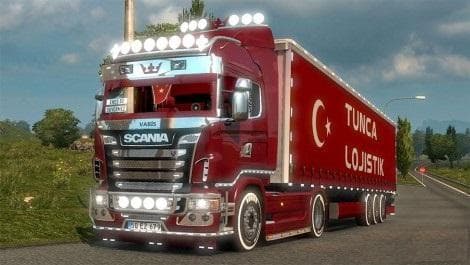
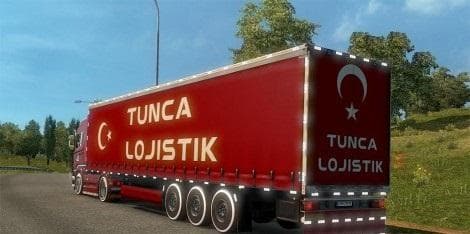
This mod adds the SCANIA R2009 truck with interior and trailer to Euro Truck Simulator 2 version 1.22. Created by Euro truck simulator 2, it has been tested and
The SCANIA R2009 + INTERIOR + TRAILER V2 mod adds a detailed Scania R model from 2009 to Euro Truck Simulator 2. It includes both the exterior cab and interior, as well as a matching trailer, offering a complete setup for drivers who want to expand their truck roster. This type of mod typically replaces or supplements existing trucks in the game, making it purchasable from dealers like any stock vehicle.
Truck mods like this one bring new options to ETS2 by adding unique engine and transmission setups along with paint jobs that fit the model's style. The inclusion of an interior means players can enjoy a consistent visual experience while driving, which some find enhances immersion during long hauls. The trailer component also allows for more variety when hauling cargo across the map.
When adding truck mods, it's good practice to check for compatibility with other mods, especially those that affect trucks or interiors. Load order matters: placing truck mods after general map or physics mods can help avoid conflicts. Since this mod supports ETS2 version 1.22, it should work smoothly on setups running that game version but might need adjustments for newer releases.
Players who prefer driving European trucks and want to try out older Scania models might appreciate this addition. It fits well in modded garages alongside other vehicles and can be part of themed convoys or roleplay scenarios that focus on classic rigs. Trailer enthusiasts also get an extra option that complements the cab aesthetically.
Since creator details are unknown and file size isn't specified, users should back up their profiles before installation as with any third-party content. This ensures no loss if issues arise during use or updates. Overall, it’s a straightforward truck mod that expands your fleet with an iconic Scania from the late 2000s.
How to install
1. Download the .scs file from the original source linked above. 2. Copy the file to `Documents/Euro Truck Simulator 2/mod/`. 3. Launch ETS2, open the Mod Manager from the main menu, enable the mod, restart the game. 4. Visit any truck dealer to spawn the new truck.
After the mod loads, save your game inside a safe area (parking lot or service) before deciding whether to keep it. If the game refuses to load with the mod enabled, check that all required DLCs are installed and that the supported ETS2 version chips on this page include your installed game patch.
Reviews
No ratings yetNo reviews yet — be the first to rate this mod.





![Fuso Supergreat Hi Cab Truck [1.50 – 1.60] – Trucks mod for Euro Truck Simulator 2](/_next/image?url=https%3A%2F%2F802software.s3.us-east-1.amazonaws.com%2Fets2modspot%2Fscreenshots%2F7494%2F0.jpg&w=3840&q=75)