Scania 143M V8 Rigid Combo v10 1.60
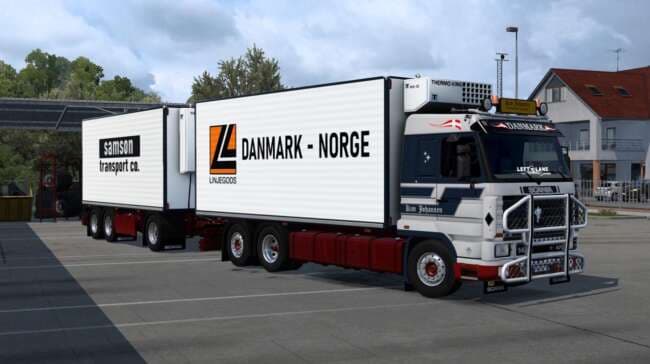
The Scania 143M V8 Rigid Combo v10 1.60 is a truck mod for ETS2 version 1.60 created by ets2mods. It features a 6x2 Taglift Chassis, 2 engine sounds, 4 transmis
The Scania 143M V8 Rigid Combo v10 for ETS2 is a truck mod that introduces a drivable cab and chassis combo. This particular version supports ETS2 1.60 and offers multiple customization options, including different interiors and steering wheels. It fits into the game as a purchasable vehicle at dealers, expanding your garage with a classic Scania model.
Truck mods like this one generally add new engine and transmission choices to tailor your driving experience. The Scania 143M includes two engine sounds and four transmissions, which means you can adjust performance to match various hauling needs or personal preferences. Interiors come in two color schemes, giving some visual variety inside the cab.
Adding this mod to a modded setup should be straightforward if you're running ETS2 version 1.60, as it's designed specifically for that update. It's wise to load truck mods after map or gameplay mods to avoid conflicts, especially when other trucks are involved. Compatibility usually isn't an issue unless there are overlapping files from other truck mods.
This mod caters to players who enjoy classic European trucks and want more options beyond the base game offerings. If you appreciate detailed cabins with multiple interior colors and steering wheel choices, this one has those extras covered. It works well for anyone looking to diversify their fleet with an older Scania rig in ETS2.
Since it's tagged under trucks, expect it to appear at in-game dealers where you can buy and customize it before setting out on routes across regions like Germany, France, or Spain. Its versatility makes it suitable for long hauls or regional deliveries depending on how you configure the engine and transmission setup.
How to install
1. Download the .scs file from the original source linked above. 2. Copy the file to `Documents/Euro Truck Simulator 2/mod/`. 3. Launch ETS2, open the Mod Manager from the main menu, enable the mod, restart the game. 4. Visit any truck dealer to spawn the new truck.
After the mod loads, save your game inside a safe area (parking lot or service) before deciding whether to keep it. If the game refuses to load with the mod enabled, check that all required DLCs are installed and that the supported ETS2 version chips on this page include your installed game patch.
Reviews
No ratings yetNo reviews yet — be the first to rate this mod.





![Fuso Supergreat Hi Cab Truck [1.50 – 1.60] – Trucks mod for Euro Truck Simulator 2](/_next/image?url=https%3A%2F%2F802software.s3.us-east-1.amazonaws.com%2Fets2modspot%2Fscreenshots%2F7494%2F0.jpg&w=3840&q=75)