SCANIA 143 SKIN + TRAILER
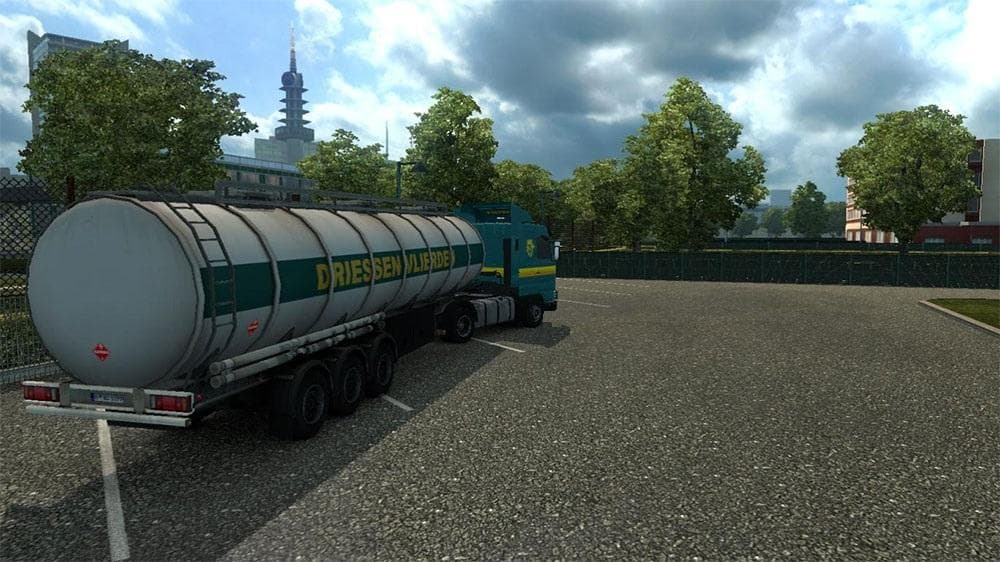
This mod adds an old school Driessen Vlierden skin for the Scania 143 truck, along with a standalone trailer. Created by Euro Truck Simulator 2, the file size a
The SCANIA 143 SKIN + TRAILER mod brings a vintage paint job to your ETS2 game, representing the classic Driessen Vlierden livery from the early 1990s through to 2006. This kind of skin mod doesn't alter the truck or trailer's model but instead provides a fresh coat of paint in the in-game paint shop, letting you customize your vehicle's appearance while keeping the original design intact.
Skins like this one are designed for specific base vehicles—in this case, the Scania 143—and also include a standalone trailer with matching visuals. Applying such mods is usually straightforward: once installed, they appear as selectable options when customizing your truck and trailer. Because it repaints existing models without changing their structure, compatibility issues with other mods tend to be minimal.
In a modded setup featuring multiple skins or custom trucks, load order might not be critical here since skin mods typically override only texture files related to their target vehicles. Still, it's wise to place skins after any general truck model mods to ensure textures display correctly. The standalone trailer included means you can pair it easily without needing additional files or dependencies.
Players who enjoy historical or retro styles on their rigs will find this mod appealing. It offers an authentic look reflecting trucking heritage from over two decades ago, which can add some character and nostalgia to your convoy runs. Whether you're cruising through European landscapes or hauling freight across various states tagged here like germany or france, this skin offers a distinct visual theme.
While details like version compatibility and file size remain unknown, applying skins like these generally requires only that you have the correct base vehicle present in your game. No changes to gameplay occur; it's purely cosmetic but can refresh how your trucks stand out on the road.
How to install
1. Download the .scs file. 2. Drop it into `Documents/Euro Truck Simulator 2/mod/`. 3. Enable in Mod Manager. 4. Apply the skin in the truck/trailer paint shop.
After the mod loads, save your game inside a safe area (parking lot or service) before deciding whether to keep it. If the game refuses to load with the mod enabled, check that all required DLCs are installed and that the supported ETS2 version chips on this page include your installed game patch.
Reviews
No ratings yetNo reviews yet — be the first to rate this mod.