Road Arrow FIX
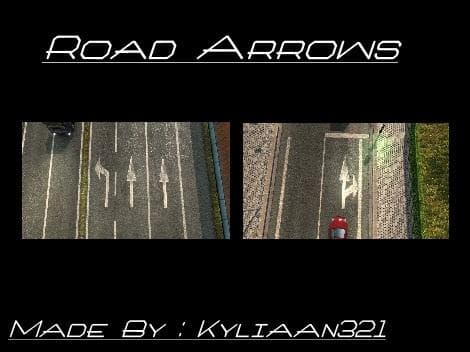
ROAD ARROW FIX is a parts mod for Euro Truck Simulator 2 by the creator Kyliaan321. The fix addresses road arrow issues and is available for download as a 105 K
Road Arrow FIX is a parts mod for Euro Truck Simulator 2 aimed at addressing issues with road arrows. Parts mods like this one typically add or adjust accessories and small details on trucks, helping improve visual accuracy or fix in-game glitches related to specific components. While this mod focuses on road arrows, it falls into the broader category of parts that can be managed through the truck customization menu.
In ETS2, parts mods are popular among players who want to enhance their driving experience by tweaking truck details beyond what the base game offers. Fixes for specific elements such as arrows on roads help keep the environment consistent and can complement other map or realism mods. This kind of modification usually integrates smoothly without requiring heavy adjustments to the load order.
When setting up a modded profile, users should ensure that parts mods like Road Arrow FIX do not conflict with other visual or map enhancements affecting road markings or traffic signs. Given the specialized nature of this fix, it is likely compatible with most setups but placing it after major map mods in your load order might help avoid overlap.
This mod is suited for players who have encountered problems with how road arrows display or function during their hauls. It’s also useful for those who prefer a polished driving environment where minor visual errors are corrected. Since details matter when you’re immersed in ETS2’s long drives, such fixes contribute quietly but effectively to gameplay quality.
Although creator information and supported versions aren’t listed, installing parts mods like this generally involves placing files in the correct mod folder and activating them via the game’s Mod Manager. As always, backing up saves before adding new mods helps prevent unexpected issues.
How to install
1. Download the file(s) from the original source linked above. 2. Drop them into `Documents/Euro Truck Simulator 2/mod/`. 3. Enable in Mod Manager and restart the game.
After the mod loads, save your game inside a safe area (parking lot or service) before deciding whether to keep it. If the game refuses to load with the mod enabled, check that all required DLCs are installed and that the supported ETS2 version chips on this page include your installed game patch.
Reviews
No ratings yetNo reviews yet — be the first to rate this mod.