NEW ROAD TEXTURE 1.22.X
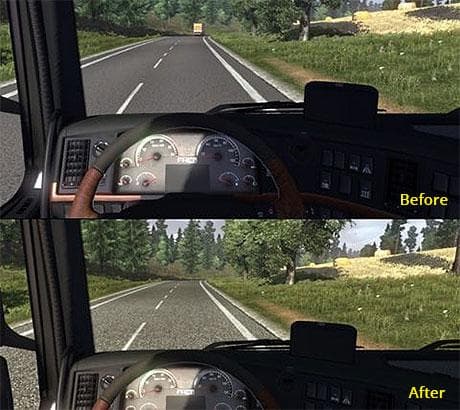
This mod, titled "NEW ROAD TEXTURE 1.22.X", offers updated road textures for Euro Truck Simulator 2 versions 1.22 and 1.4. Created by Euro truck simulator 2, th
NEW ROAD TEXTURE 1.22.X is a map mod designed to update or replace the road textures in Euro Truck Simulator 2 for version 1.22 and compatible with 1.4 as well. This type of mod focuses on enhancing the visual aspect of driving surfaces, often making them appear more detailed or realistic compared to the base game’s default textures. It doesn’t add new roads or regions but changes how existing roads look while you drive through the map.
Map mods like this one usually come as .scs files that need to be placed in the game's mod folder and activated through the mod manager. Because map mods are sensitive to load order, it’s recommended to check compatibility with other map expansions or modifications you have installed. Sometimes they require a fresh profile or specific base DLCs, but for a road texture mod, these demands tend to be less strict than full map expansions.
This road texture update fits well into a modded setup focused on improving visual fidelity without altering gameplay mechanics or adding new places. It can be combined with other graphical enhancements, such as weather or lighting mods, without much risk of conflict. Still, players should avoid stacking multiple road texture mods since only one set of textures can be active at once.
Drivers looking for subtle improvements in their driving environment would appreciate this mod. It refreshes the look of familiar routes without changing navigation or map layout, which is ideal for those who prefer a cleaner visual upgrade rather than extensive map overhauls.
How to install
1. Download every .scs file from the source page (map mods often ship multiple files). 2. Copy all files to `Documents/Euro Truck Simulator 2/mod/`. 3. Enable each file in Mod Manager **in the order documented by the modder**. Load order matters for maps. 4. Start a new save or use an existing save that already supports the map's base regions.
After the mod loads, save your game inside a safe area (parking lot or service) before deciding whether to keep it. If the game refuses to load with the mod enabled, check that all required DLCs are installed and that the supported ETS2 version chips on this page include your installed game patch.
Known conflicts
No conflicts reported for this mod yet. Running a big mod list? Check your whole setup for conflicts →
Reviews
No ratings yetNo reviews yet — be the first to rate this mod.





