NEW MAP SYMBOLS
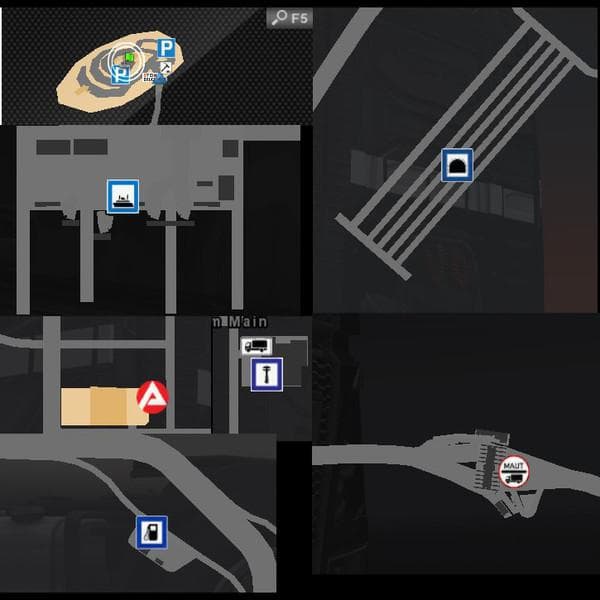
This mod, titled NEW MAP SYMBOLS, alters various in-game signs that appear both on the navigation system and the map card in Euro Truck Simulator 2. It changes icons for locations such as ferries, quarries, toll roads, and train crossings like the Euro Tunnel, along with dealer markers. By adjusting these symbols, it provides a fresh way to identify key points during your journeys without changing the actual map layout or geography.
Map mods like this one typically work by replacing or adding files that define how certain elements look on your map interface. Since this is a standalone mod focused on symbols rather than expanding or reworking roads or cities, it tends to be lighter and less intrusive. Players install it by placing the .scs file into their mod folder and activating it through the game's mod manager.
Compatibility is usually straightforward for mods of this type since they don't alter large-scale map data. However, because it's modifying visual elements tied to navigation and map overlays, load order matters if you use other mods affecting similar assets. It's wise to keep an eye on conflicts with other map symbol or icon replacements to prevent visual glitches.
This mod fits well within a broader modded setup where players want clearer or different visual cues on their map without overhauling their driving environment. Anyone who spends a lot of time navigating ETS2's extensive road network may appreciate these refined symbols as they help recognize special locations faster while driving.
Given its support for ETS2 version 1.1 and focus on updated signage icons rather than adding new routes or regions, this mod suits players who prefer subtle quality-of-life improvements that maintain original map content intact.
How to install
1. Download every .scs file from the source page (map mods often ship multiple files). 2. Copy all files to `Documents/Euro Truck Simulator 2/mod/`. 3. Enable each file in Mod Manager **in the order documented by the modder**. Load order matters for maps. 4. Start a new save or use an existing save that already supports the map's base regions.
After the mod loads, save your game inside a safe area (parking lot or service) before deciding whether to keep it. If the game refuses to load with the mod enabled, check that all required DLCs are installed and that the supported ETS2 version chips on this page include your installed game patch.
Known conflicts
No conflicts reported for this mod yet. Running a big mod list? Check your whole setup for conflicts →
Reviews
No ratings yetNo reviews yet — be the first to rate this mod.





