MERCEDES BENZ ACTROS MEGA SPACE 4
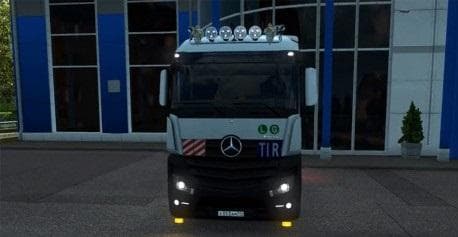
MERCEDES BENZ ACTROS MEGA SPACE 4 is an ETS2 parts.
The MERCEDES BENZ ACTROS MEGA SPACE 4 mod offers a range of new parts for the iconic Actros truck, focusing on both exterior and interior enhancements. This includes paintable grills, updated bumpers, new wheels, and functional fog lights. On the inside, it adds small details like coffee cups and papers that contribute to a more lived-in cabin feel. Mods like this one generally plug into the truck customization menu where players can pick and fit various accessories to personalize their vehicles.
Parts mods in Euro Truck Simulator 2 typically serve to expand the variety of visual and functional options for specific truck models. They don't change gameplay mechanics but allow for deeper personalization through tuning. This particular mod fits into that category by offering parts tailored specifically to the Mercedes-Benz Actros Mega Space cab, helping drivers make their trucks stand out on European roads or in heavily modded fleets.
When integrating parts mods such as this into a larger mod setup, it's wise to consider load order since some parts may overlap with other tuning mods targeting the same truck model. Usually, these mods work fine alongside map expansions and cargo packs but should be placed below any core gameplay or physics mods. Compatibility is generally straightforward if you stick to one set of tuning mods per truck model to avoid conflicts or missing textures.
This kind of mod will appeal mostly to players who enjoy customizing trucks beyond factory options, especially those who favor Mercedes-Benz vehicles. It's well suited for anyone running a heavily customized fleet or simply wanting some fresh looks and detail inside the cab while driving across regions like Germany or France. The added interior items help create a more immersive experience during long hauls.
How to install
1. Download the file(s) from the original source linked above. 2. Drop them into `Documents/Euro Truck Simulator 2/mod/`. 3. Enable in Mod Manager and restart the game.
After the mod loads, save your game inside a safe area (parking lot or service) before deciding whether to keep it. If the game refuses to load with the mod enabled, check that all required DLCs are installed and that the supported ETS2 version chips on this page include your installed game patch.
Reviews
No ratings yetNo reviews yet — be the first to rate this mod.