Marcopolo G6 1800 DD Scania 8X2 Ets2 1.60
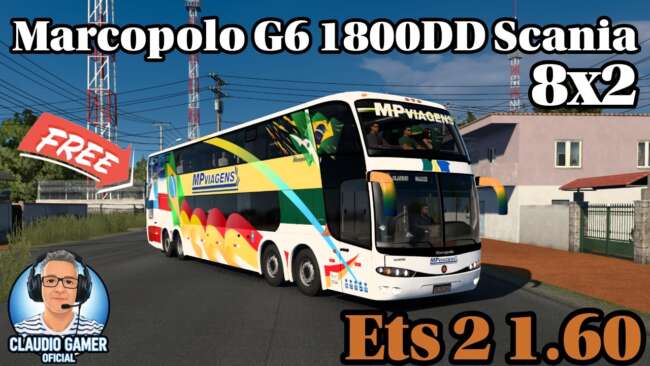
The Marcopolo G6 1800 DD Scania 8X2 is a high-quality truck mod for ETS2 version 1.60. It features a detailed exterior and interior design with realistic interi
The Marcopolo G6 1800 DD Scania 8X2 is a truck mod designed for Euro Truck Simulator 2 version 1.60. This mod adds a new drivable vehicle to the game, featuring both exterior and interior designs that aim for high detail. Players can find it available for purchase at dealerships within the game, like other truck mods.
Truck mods such as this one generally introduce new cab and chassis options, often including multiple engine and transmission configurations. They typically come with dedicated interiors that offer various paint jobs or color schemes—in this case, two interior colors are provided: beige and black. The lighting inside the cabin is also crafted to reflect realistic night conditions, enhancing immersion during nighttime driving.
When integrating this mod into a setup with other modifications, it's essential to load it in an order that prevents conflicts, especially with other truck or vehicle skins. Truck mods usually need to be placed higher in the load order than map or traffic mods but below core game updates to work correctly without issues.
This specific mod would appeal mainly to players who enjoy customizing their fleet with distinctive trucks that stand out from standard models. Those looking for a detailed interior experience along with varied color options will appreciate what this addition brings to their garage. It fits well in setups focusing on realism and aesthetic variety.
Compatible with ETS2 version 1.60, this truck mod aligns with other content designed for the same update level, reducing chances of incompatibilities due to game version differences. Since it was created by ets2mods, users familiar with their releases may find installation and use straightforward compared to more complex third-party packs.
How to install
1. Download the .scs file from the original source linked above. 2. Copy the file to `Documents/Euro Truck Simulator 2/mod/`. 3. Launch ETS2, open the Mod Manager from the main menu, enable the mod, restart the game. 4. Visit any truck dealer to spawn the new truck.
After the mod loads, save your game inside a safe area (parking lot or service) before deciding whether to keep it. If the game refuses to load with the mod enabled, check that all required DLCs are installed and that the supported ETS2 version chips on this page include your installed game patch.
Reviews
No ratings yetNo reviews yet — be the first to rate this mod.





![Fuso Supergreat Hi Cab Truck [1.50 – 1.60] – Trucks mod for Euro Truck Simulator 2](/_next/image?url=https%3A%2F%2F802software.s3.us-east-1.amazonaws.com%2Fets2modspot%2Fscreenshots%2F7494%2F0.jpg&w=3840&q=75)