MAN TGX Dashboard 1.20.x
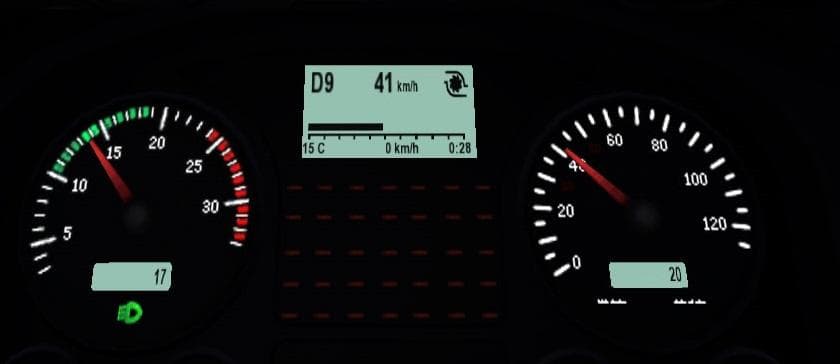
MAN TGX Dashboard 1.20.x - ETS2 mods download is an ETS2 parts. Listed compatible with ETS2 1.20.
The MAN TGX Dashboard 1.20.x mod brings a redesigned dashboard specifically for the MAN TGX truck in Euro Truck Simulator 2. It updates the interior with new instruments like trip distance under the tachometer, an odometer beneath the speedometer, and gauges for oil pressure, water temperature, and turbine pressure. These additions provide more detailed information directly on your virtual dash.
Parts mods such as this one focus on enhancing truck interiors or adding accessories through the customization menu. They usually target a particular truck model—in this case, the MAN TGX—and offer improvements that can make driving feel more immersive or tailored to personal preference. Interior parts mods don’t typically affect gameplay mechanics but do enrich the visual experience and instrument feedback.
When using parts mods like this dashboard upgrade, it's essential to load them properly alongside other mods to avoid conflicts, especially those that also modify interiors or dashboards of the same truck model. Generally, these are compatible with most setups if placed correctly in your mod manager's load order. Since this version supports ETS2 1.20, it aligns well with other mods updated for that game version.
This mod fits well within a modded setup aimed at enhancing realism or detail inside your cab without altering core gameplay. Players who enjoy fine-tuning their trucks’ appearance and want extra information displayed on their dashboard will appreciate what it offers. It’s a solid pick for anyone who spends hours behind the wheel of the MAN TGX and wants their cockpit to reflect additional real-world metrics.
Overall, if you’re looking to expand your MAN TGX’s dashboard functionality with extra meters and readouts while keeping things visually consistent with ETS2 1.20 standards, this mod is worth considering.
How to install
1. Download the file(s) from the original source linked above. 2. Drop them into `Documents/Euro Truck Simulator 2/mod/`. 3. Enable in Mod Manager and restart the game.
After the mod loads, save your game inside a safe area (parking lot or service) before deciding whether to keep it. If the game refuses to load with the mod enabled, check that all required DLCs are installed and that the supported ETS2 version chips on this page include your installed game patch.
Reviews
No ratings yetNo reviews yet — be the first to rate this mod.