MACROPOLO G7 1600LD BORUSSIA DORTMUND SKIN
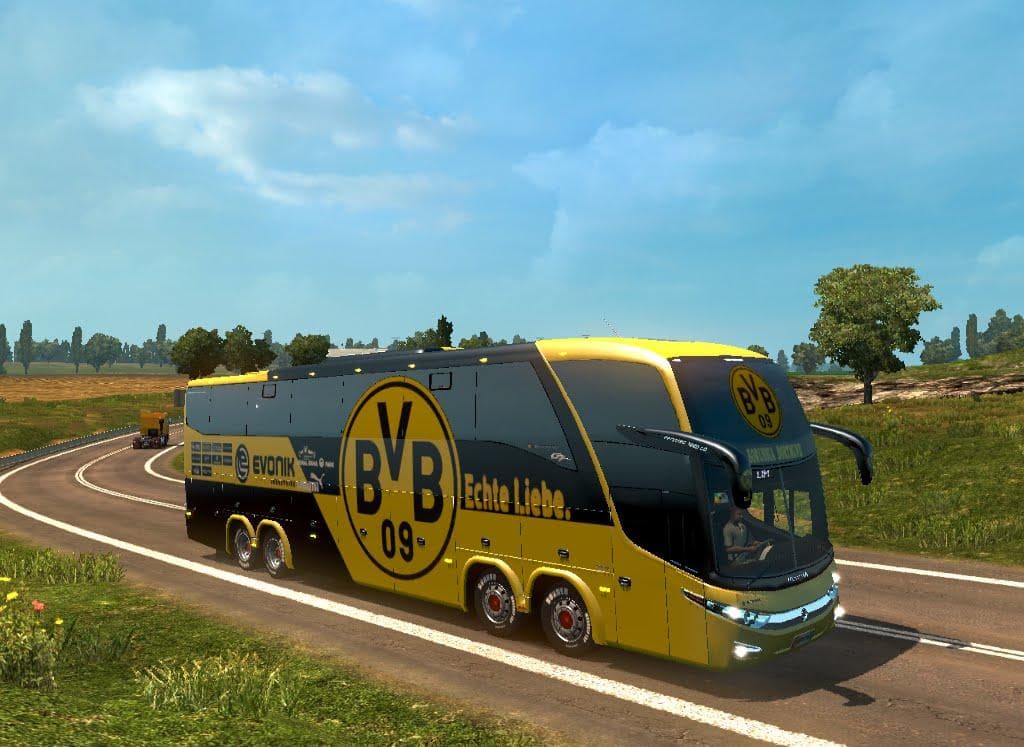
This skin mod adds a Borussia Dortmund Bus Macropolo G7 LD 1600 8x2 skin to ETS2, available at the Scania Truck Dealer. It is compatible with ETS2 versions 1.18
The MACROPOLO G7 1600LD BORUSSIA DORTMUND SKIN is a repaint designed for the Macropolo G7 LD 1600 bus model in Euro Truck Simulator 2. This skin gives the bus a distinctive Borussia Dortmund livery, aligning it with the famous German football club's colors and branding. It doesn’t alter the vehicle’s structure or performance but changes its appearance to reflect this theme.
Skin mods like this one are applied through the paint shop in ETS2 and require the base vehicle—in this case, the Macropolo G7 LD 1600—to be installed beforehand. They only modify how trucks or buses look, so they’re a straightforward way to customize your fleet without affecting gameplay mechanics or adding new vehicles.
This particular skin supports ETS2 versions from 1.18 up to 1.21, which covers several updates of the game. When using skins, it’s worth noting that they should be loaded after map or vehicle mods to avoid conflicts and ensure that the repaint displays correctly on the intended model. If you have multiple skins for the same vehicle, load order determines which one appears in-game.
In a modded setup featuring various trucks and buses, adding a themed skin like this can enhance immersion if you’re a fan of Borussia Dortmund or just want something different from default liveries. It's especially appealing if your route includes Germany or nearby countries since it fits well with local themes.
Players who enjoy personalizing their vehicles with sports-related designs will find this skin useful. Since it’s linked to a specific bus model, it suits those who prefer using less common vehicles beyond standard trucks in their ETS2 experience.
How to install
1. Download the .scs file. 2. Drop it into `Documents/Euro Truck Simulator 2/mod/`. 3. Enable in Mod Manager. 4. Apply the skin in the truck/trailer paint shop.
After the mod loads, save your game inside a safe area (parking lot or service) before deciding whether to keep it. If the game refuses to load with the mod enabled, check that all required DLCs are installed and that the supported ETS2 version chips on this page include your installed game patch.
Reviews
No ratings yetNo reviews yet — be the first to rate this mod.