LOGO SCHMITZ CARGOBULL IN TRAILER S.KI SOLID 1.21.X
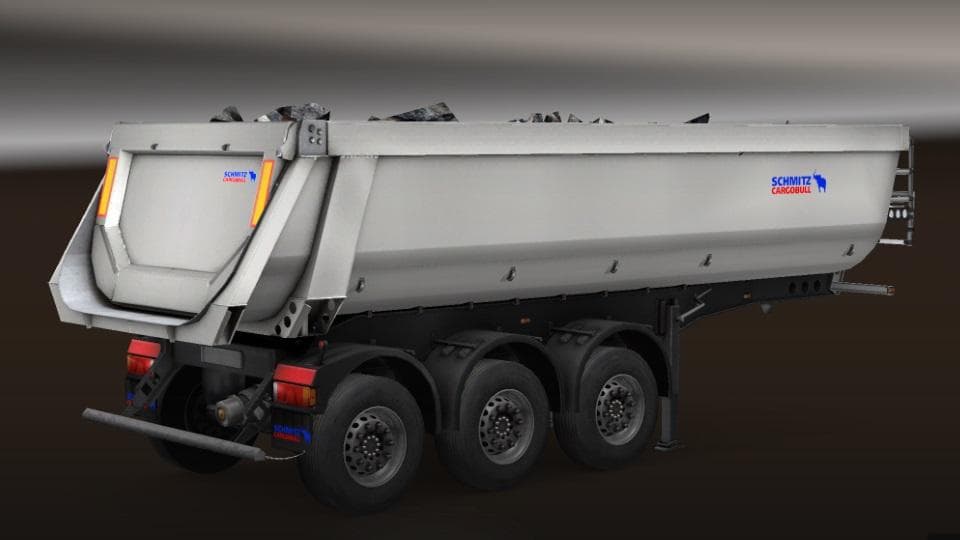
This mod adds the Logo Schmitz Cargobull to the Trailer S.KI SOLID in Euro Truck Simulator 2 version 1.21. Created by ETS2, the mod has been tested for compatib
The LOGO SCHMITZ CARGOBULL IN TRAILER S.KI SOLID mod adds a trailer skin featuring the Schmitz Cargobull logo, designed for the S.KI solid trailer model in Euro Truck Simulator 2. This particular mod works with game version 1.21.x, so it's compatible with that update range. Trailer skins like this one replace or add visual details to existing trailers, letting players customize their fleet's appearance without changing gameplay mechanics.
Trailer mods in ETS2 generally expand the variety of haulable trailers you can own or encounter during your jobs. They often show up in the cargo selection menu or at trailer dealers, offering new looks or even unique cargo types. Mods focusing on skins usually slot into an existing trailer model rather than adding completely new trailers from scratch.
For those running a modded setup, skins like this fit well as long as they target the correct trailer and game version. Load order matters since skins override visuals; placing this mod after other trailer mods ensures its textures display correctly. Compatibility issues might arise if another mod alters the same trailer model but doesn't use proper conflict rules.
This type of mod is aimed at players who want to personalize their trucking experience by updating how their trailers look on the road. Fans of Schmitz Cargobull trailers or those wanting more brand variety in their convoy will find it useful. It blends nicely with other cosmetic mods to create a more immersive trucking environment.
Since the creator is unknown and file size isn't specified, users should still back up their profiles before installing and check for any conflicts with other skin mods targeting the S.KI solid trailer model.
How to install
1. Download the .scs file. 2. Drop it into `Documents/Euro Truck Simulator 2/mod/`. 3. Enable in Mod Manager. 4. Trailer should appear in cargo selection or trailer dealer depending on the mod's design.
After the mod loads, save your game inside a safe area (parking lot or service) before deciding whether to keep it. If the game refuses to load with the mod enabled, check that all required DLCs are installed and that the supported ETS2 version chips on this page include your installed game patch.
Reviews
No ratings yetNo reviews yet — be the first to rate this mod.