LEUCHT KASTEN V2 (LIGHTBOX)
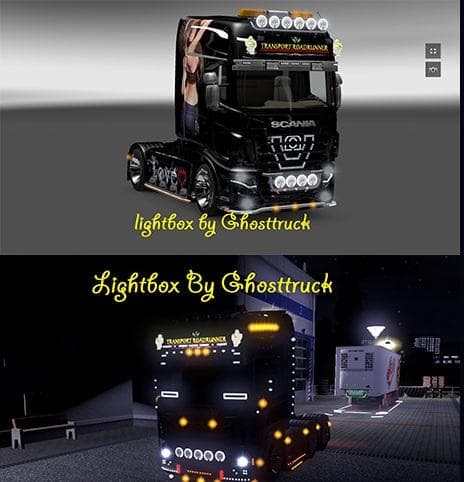
LEUCHT KASTEN V2 (LIGHTBOX) is a skin mod for ETS2 created by Euro truck simulator 2. It features a skinnable lightbox by Ghosttruck, with the original text "HI
LEUCHT KASTEN V2 (LIGHTBOX) is a skin mod designed to change the appearance of a lightbox accessory on trucks in Euro Truck Simulator 2. It doesn't alter the model itself but repaints the lightbox, allowing for customization without affecting the underlying structure. Skins like this one are applied through the game's paint shop and rely on compatibility with the base vehicle or part they were created for.
Skin mods generally let players personalize their vehicles by repainting cabins, trailers, or accessories such as lightboxes. This type of mod is quite straightforward to install—usually placed in the mod folder and enabled through the game menu. Since it only changes textures, it typically doesn’t conflict with other mods that alter models or gameplay mechanics.
When used in a modded setup, skin mods like LEUCHT KASTEN V2 should be loaded alongside other cosmetic mods without much fuss. However, if multiple skins target the same accessory or truck part, players might need to manage load order to ensure the preferred skin appears correctly. It fits well in collections focused on enhancing truck visuals rather than gameplay changes.
This particular lightbox skin was shown with custom company branding but originally featured different text. Players who enjoy tweaking their trucks' looks or want subtle visual variety might find this mod useful. It’s especially relevant for those who already use multiple visual mods and want to add more detail to their rig’s exterior.
Overall, LEUCHT KASTEN V2 adds another option for personalizing your ETS2 experience by repainting a small but noticeable truck accessory. If you’re into customizing every element of your vehicle's look, this kind of mod helps broaden those possibilities without complicated installation steps.
How to install
1. Download the .scs file. 2. Drop it into `Documents/Euro Truck Simulator 2/mod/`. 3. Enable in Mod Manager. 4. Apply the skin in the truck/trailer paint shop.
After the mod loads, save your game inside a safe area (parking lot or service) before deciding whether to keep it. If the game refuses to load with the mod enabled, check that all required DLCs are installed and that the supported ETS2 version chips on this page include your installed game patch.
Reviews
No ratings yetNo reviews yet — be the first to rate this mod.