LEDS FOR ACTROS MP3
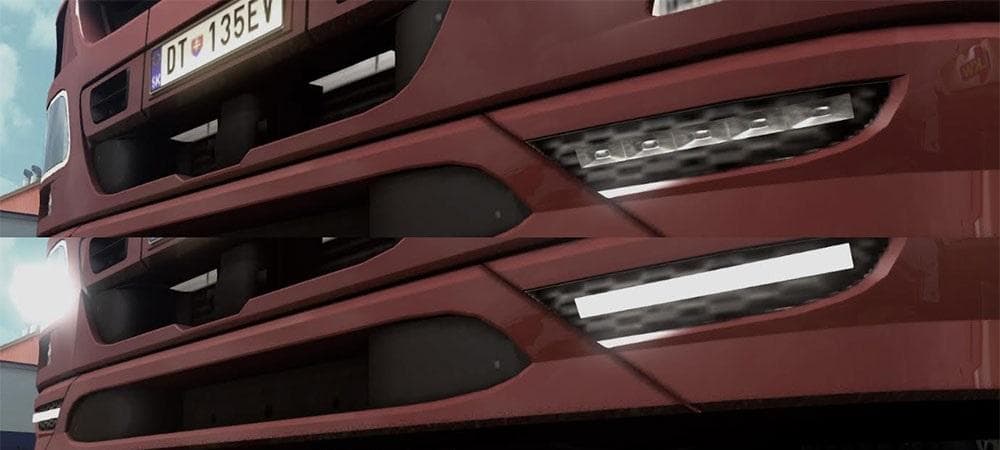
LEDS FOR ACTROS MP3 is a parts mod for Euro Truck Simulator 2, adding LEDs with lightmask to the Actros MP3 truck. The creator is credited as LEWISSVK, with the
This mod adds LED lights specifically designed for the Actros MP3 truck model in Euro Truck Simulator 2. It includes a lightmask, which helps integrate the LEDs into the truck’s existing lighting system, enhancing its appearance in the customization menu. Parts like these are installed through the truck tuning interface, where you can equip your vehicle with various accessories to suit your style.
Parts mods such as this one focus on adding or modifying accessories like lights, bull bars, mirrors, and exhausts. They usually target a specific truck brand or model—in this case, the Mercedes-Benz Actros MP3. These enhancements don't affect gameplay mechanics but offer more personalization options for players who enjoy customizing their rigs beyond the factory defaults.
When used in a modded setup, parts mods should be loaded carefully to avoid conflicts with other mods that alter similar components or add competing parts for the same truck model. It's wise to check load order if you experience issues and ensure no overlapping files exist between multiple parts packs. Since specific compatibility details are unknown here, cautious integration is recommended.
Truck enthusiasts who want to add some style and extra lighting flair to their Actros MP3 would find this mod useful. Whether you're running long hauls across European regions or just want your cab to stand out in multiplayer convoys, fitting additional LEDs can give your rig a bit more personality without changing its core functions.
Overall, mods like these appeal to players who focus on visual customization of their trucks within ETS2's tuning menus. Installing LED parts is straightforward: just place the mod file into your mod folder and activate it before starting the game. This way, you'll see new lighting options available when upgrading your Actros MP3.
How to install
1. Download the file(s) from the original source linked above. 2. Drop them into `Documents/Euro Truck Simulator 2/mod/`. 3. Enable in Mod Manager and restart the game.
After the mod loads, save your game inside a safe area (parking lot or service) before deciding whether to keep it. If the game refuses to load with the mod enabled, check that all required DLCs are installed and that the supported ETS2 version chips on this page include your installed game patch.
Reviews
No ratings yetNo reviews yet — be the first to rate this mod.