KRONE LONG V2
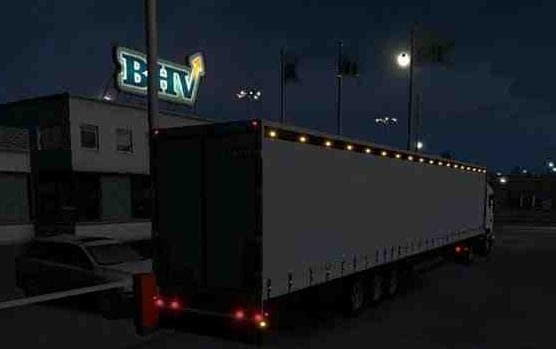
The KRONE LONG V2 mod for Euro Truck Simulator 2 adds a Coolliner trailer with realistic textures, lamps, and good physics. Credits go to adarf33, DnO, mm9070,
The KRONE LONG V2 is a trailer mod for Euro Truck Simulator 2 that replaces the original Krone Long Trailer with a version featuring custom wheels and updated textures. This mod aims to enhance the visual and physical aspects of the trailer, providing a more authentic hauling experience. Mods like this one typically add new haulable trailers or ownable bodies, which then show up in the cargo selection menu or at trailer dealerships within the game.
Trailer mods play a specific role by expanding the variety of cargo options available to players. They often include realistic physics and improved lighting effects to match the game's environment better. Since this mod has its own wheels and lamp configurations, it fits well in setups where users want trailers that look distinct from stock options but still behave naturally during transport.
When integrating trailer mods such as KRONE LONG V2 into a modded ETS2 setup, it's important to consider load order. Trailer mods usually need to be loaded after map mods but before AI traffic mods to avoid conflicts or visual glitches. Compatibility can vary depending on other installed content, so players should test different load orders if any issues arise.
This mod is suitable for players who prefer driving with trailers that offer realistic handling characteristics and detailed textures without straying too far from familiar truck combinations. Those running multiple cargo or trailer packs might appreciate having an alternative long trailer option that blends well with existing assets.
In general, installing trailer mods involves placing their files into the game's mod folder and enabling them via the profile manager. Since version compatibility isn't specified here, users should ensure they have backups before applying new trailers to prevent save corruption or crashes.
How to install
1. Download the .scs file. 2. Drop it into `Documents/Euro Truck Simulator 2/mod/`. 3. Enable in Mod Manager. 4. Trailer should appear in cargo selection or trailer dealer depending on the mod's design.
After the mod loads, save your game inside a safe area (parking lot or service) before deciding whether to keep it. If the game refuses to load with the mod enabled, check that all required DLCs are installed and that the supported ETS2 version chips on this page include your installed game patch.
Reviews
No ratings yetNo reviews yet — be the first to rate this mod.





