KENWORTH T908 QANTAS FREIGHT SKIN
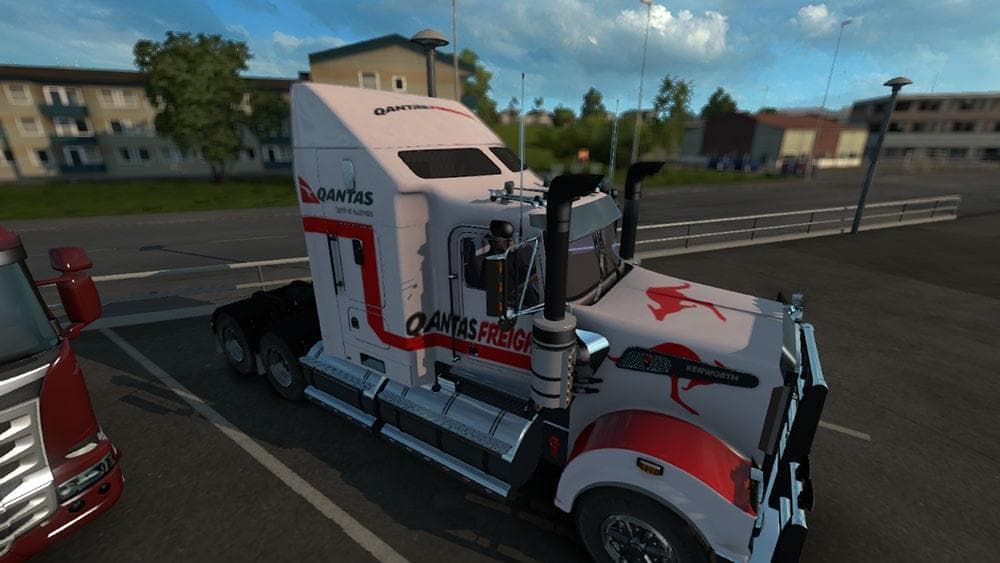
KENWORTH T908 QANTAS FREIGHT SKIN is an ETS2 skins. Listed compatible with ETS2 1.21.
The KENWORTH T908 QANTAS FREIGHT SKIN is a paint job designed for the Kenworth T908 truck in Euro Truck Simulator 2. Instead of altering the truck's shape or adding new parts, this mod changes its appearance to reflect the Qantas Freight livery, giving your rig a distinct look associated with the Australian cargo company. Skins like this one are applied through the in-game paint shop and require you to have the original Kenworth T908 model installed.
Skin mods in ETS2 work by repainting existing vehicles without modifying their core models. This means they’re relatively easy to install and typically won’t interfere with other mods that add trucks or trailers. However, since they depend on specific base vehicles, you need to make sure you have the matching truck version—in this case, compatible with ETS2 version 1.21—for it to display correctly.
In a heavily modded setup, skin mods like this can fit neatly alongside other cosmetic or gameplay enhancements. Since skins only alter visuals, they usually load without conflicts but should be placed after any truck model mods in your mod manager's load order. This ensures that the skin overlays properly on top of the vehicle files provided by other mods.
One point worth noting is that you might need to adjust certain parts of your truck—such as air filters—to get the paint job looking just right. This tweak isn’t uncommon with skin mods when fitting complex liveries onto detailed truck models.
Players who enjoy customizing their fleet with authentic liveries will find this mod appealing, especially if they’re fans of Australian freight themes or want to add variety beyond default paint options. It’s a straightforward way to personalize your driving experience without altering gameplay mechanics.
How to install
1. Download the .scs file. 2. Drop it into `Documents/Euro Truck Simulator 2/mod/`. 3. Enable in Mod Manager. 4. Apply the skin in the truck/trailer paint shop.
After the mod loads, save your game inside a safe area (parking lot or service) before deciding whether to keep it. If the game refuses to load with the mod enabled, check that all required DLCs are installed and that the supported ETS2 version chips on this page include your installed game patch.
Reviews
No ratings yetNo reviews yet — be the first to rate this mod.